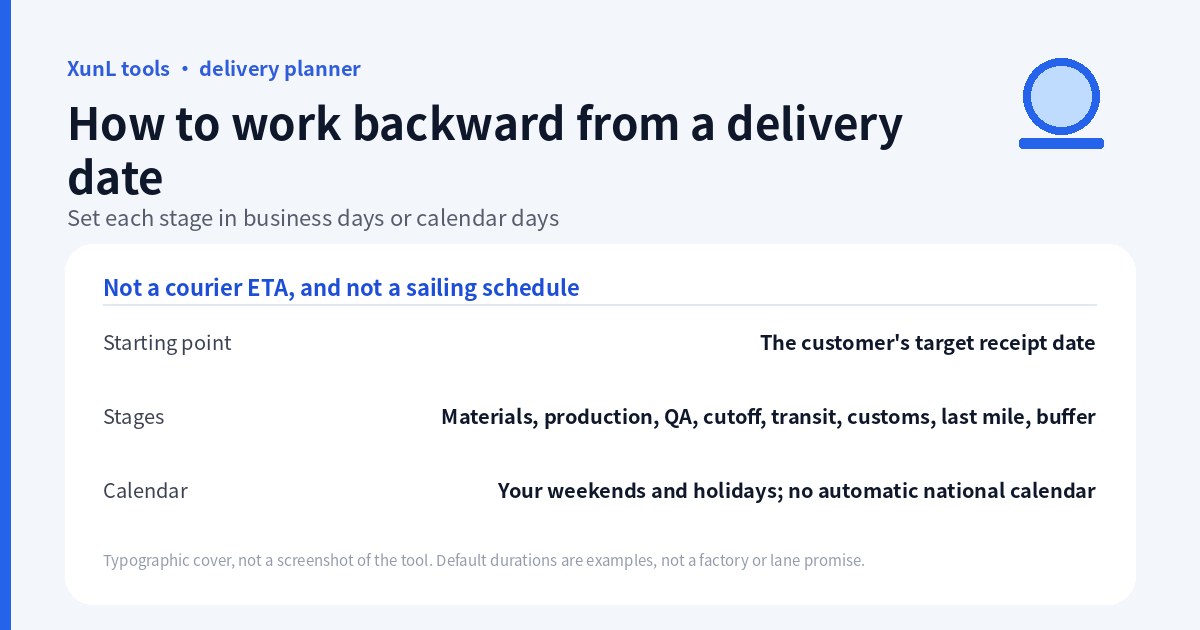
“The customer needs it on 30 June” is not a production start date. Work backward through delivery, clearance, transit, inspection, manufacturing and materials, keeping business-day tasks separate from calendar-day allowances. That produces a sequence to discuss with suppliers—not a courier’s predicted arrival time.
The delivery deadline and production backward planner is built for this manufacturing-and-logistics question. This guide follows its public documentation reviewed on 18 November 2026 (Asia/Shanghai). It does not track a parcel, query a shipping line or reserve transport.
Define “received” before entering the date
Agree on the place and event: receipt at the customer’s warehouse is different from arrival at a destination port. If your target already means delivery after clearance, adding clearance again can double-count it. Conversely, using a port-arrival date as the customer’s warehouse receipt date can omit downstream work.
Ask who confirms each duration. A factory supplies production assumptions; a forwarder or carrier confirms transport constraints; the receiver confirms delivery access. The planner combines the durations you enter. It does not obtain those confirmations for you.
A complete demonstration input, with explicit dates
Use 2027-06-30 as target receipt date and 2026-11-18 as comparison date. These are fixed demonstration dates, not moving “today” defaults. If you use Reset example, overwrite both dates afterward.
For this exercise, keep Saturday and Sunday non-working and leave the holiday list empty. Set the stages as follows:
| Stage, in forward execution order | Days entered | Basis |
|---|---|---|
| Materials | 7 | Business days |
| Production | 20 | Business days |
| QA / inspection | 2 | Business days |
| Cutoff / waiting | 3 | Calendar days |
| International transit | 28 | Calendar days |
| Customs clearance | 3 | Business days |
| Last-mile delivery | 3 | Calendar days |
| Buffer | 5 | Calendar days |
These are editable examples, not typical lead times for a real factory or route. In a real plan, replace each with a confirmed assumption. Calendar transit days do not imply that a sailing exists on the calculated departure date.
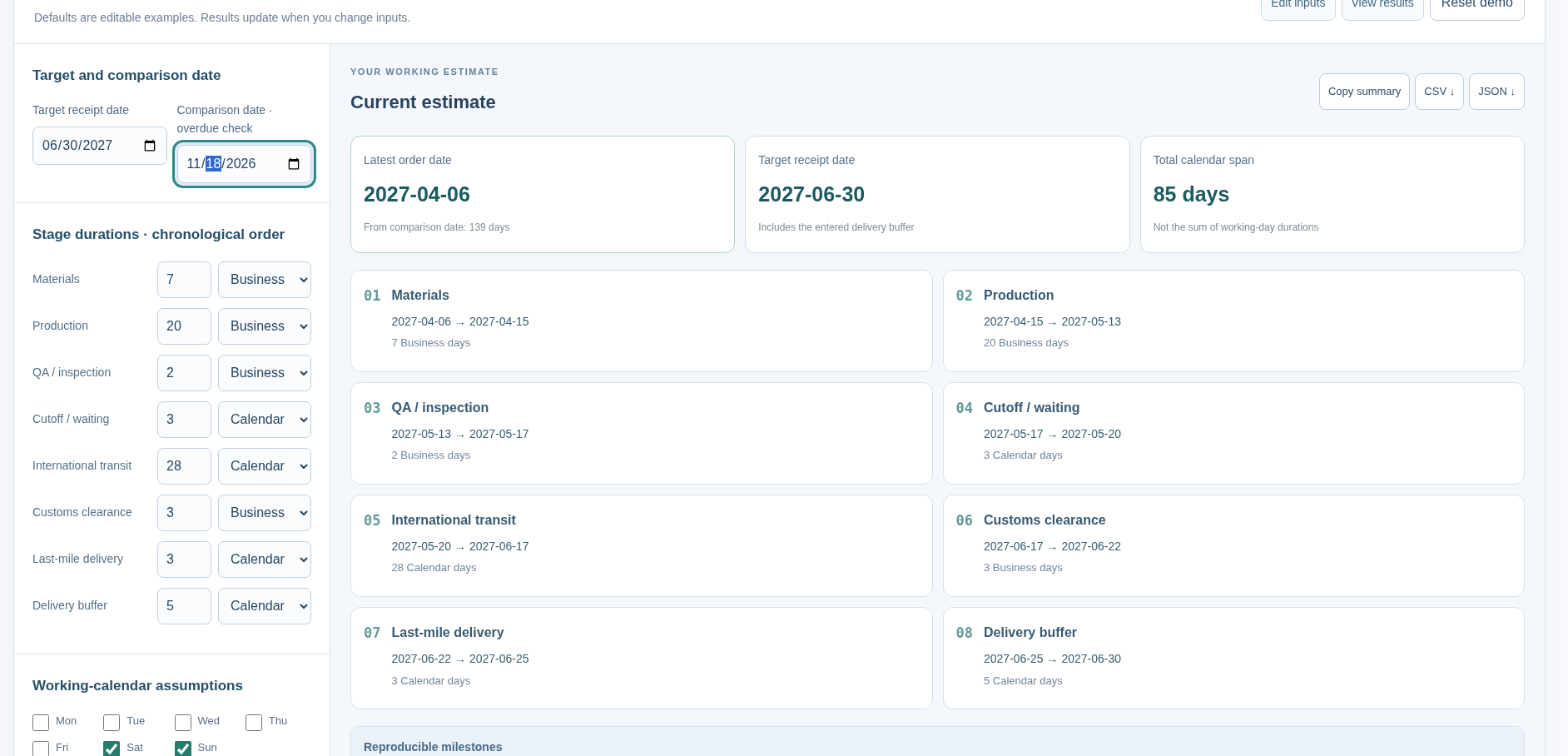
On 18 November 2026 at 07:28 Asia/Shanghai, the public page with those inputs showed: latest order date 2027-04-06; target receipt 2027-06-30; total calendar span 85 days; 139 days from the comparison date. No business-stage deadline pull-forward was shown on this timeline. The stage dates were: materials 2027-04-06 → 2027-04-15 (7 business days); production 2027-04-15 → 2027-05-13 (20 business days); QA / inspection 2027-05-13 → 2027-05-17 (2 business days); cutoff / waiting 2027-05-17 → 2027-05-20 (3 calendar days); international transit 2027-05-20 → 2027-06-17 (28 calendar days); customs clearance 2027-06-17 → 2027-06-22 (3 business days); last-mile delivery 2027-06-22 → 2027-06-25 (3 calendar days); delivery buffer 2027-06-25 → 2027-06-30 (5 calendar days). This is a plan under these example assumptions, not a factory or sailing commitment.
Why the sum of the stage numbers is not the elapsed lead time
Business days skip the non-working weekdays and holidays you configure; calendar days count every date. Adding the eight numeric durations and subtracting that total as calendar days would ignore the different bases.
The page documents a precise endpoint rule: the starting date is not counted. Each one-day move forward or backward counts only if eligible for that stage. A business-day stage whose deadline falls on a non-working date first pulls its end earlier to an eligible workday. The result reports that gap separately so the stage can be checked by counting forward again.
That pull-forward is important. A weekend between two milestones is not automatically extra production time, and an earlier business-stage end may create a gap before the next stage. Keep the reported stage endpoints and pull-forward allowance, rather than relabeling every gap as a deliberately added buffer.
The calculation works backward from the receipt end of the chain. Read the final timeline in forward execution order as well: materials → production → inspection → cutoff waiting → transit → clearance → last-mile → buffer → target receipt. Check that every handoff is meaningful for your order.
Holidays are your input, not an automatic national calendar
Select non-working weekdays and enter holidays as YYYY-MM-DD, one per line; the page also accepts spaces or commas. With an empty holiday list, the example excludes only the selected non-working weekdays from business stages. It does not automatically know public holidays in China, the customer’s country or the ports involved.
The page supports at most 500 holiday entries, 365 days per stage and requires at least one working weekday. It uses one configured work calendar for the business-day calculations. If factory, inspection service and destination customs use different calendars, check those milestones separately; do not present one shared setting as a complete multinational operating calendar.
This demonstration did not add holidays; business-day stages skipped only the selected Saturday and Sunday. The holiday rules below come from the page documentation, not from a separate holiday experiment.
“Overdue” compares two dates; it does not approve a rush
The planner calls the latest order date overdue when it is earlier than the comparison date you entered. A fixed comparison date makes a saved scenario reproducible; it is not necessarily the date on which someone later opens the page.
If the plan is overdue, separate possible actions: change the requested receipt date; ask whether a specific controllable stage can change; or confirm whether an alternative route or resources are actually available. Do not simply reduce every duration until the status looks acceptable. A shorter input is an assumption, not evidence that the factory can expedite.
Afterwards, on the English page, the receipt date and stage settings were left unchanged and only the comparison date was set to 2027-04-07. The latest order date remained 2027-04-06. The on-screen alert was exactly: “× Earlier than the comparison date by 1 days.” That compares two dates; it does not mean a rush is feasible.
Use the output as a discussion record
Save the inputs with the timeline: target place/date, comparison date, stage day bases, weekends, holiday list and explicit buffer. The page offers summary copying and CSV/JSON output; verify the saved file against the scenario before passing it on. Export-button availability is not a test of file contents.
Date arithmetic is documented as using UTC date-only integers to avoid daylight-saving day-length changes. That is an internal date-counting method, not a conversion of a factory deadline into a universal cutoff hour. The planner does not model shifts, flight or vessel departures, cutoff clock times or actual customs release.
For adjacent checks, use the mixed-container loading guide for load assumptions and the commercial invoice/packing-list checklist for document consistency. Neither supplies a sailing schedule. Cost estimates belong in the separate landed-cost guide, not in this date arithmetic.
The page says scheduling stays in the browser without reading a company calendar or querying a shipping line. This does not establish that the whole website makes no network requests. Most importantly, a calculated latest start is a planning result, not a signed delivery commitment.
Put this guide to work for your business
Start free tools with Google or an email code. Create a company and compare Pro plans when you need monitoring and team permissions.
Personal accounts use Free limits. A separate new company receives a 7-day Pro trial, excluding paid monthly credits.