A packing list totals 21.824 m³. A 20-foot dry container has roughly 33 m³ of internal space. Does the shipment fit? The volume comparison alone cannot answer that: the remaining space must have the right shape, and the packaging must permit the proposed orientation and stacking.
Use the free container loading calculator to reproduce the eight-crate example below. Changing one stacking permission changes the calculated requirement from two 20GP containers to one. It also provides a practical way to assess a free EasyCargo or Goodloading alternative for occasional mixed-load planning.
Start with a packing list that includes handling restrictions
These are fictional demonstration crates, not a customer shipment or an approved loading plan. Dimensions are finished outside dimensions; weights are gross weight per crate.
| Item | L × W × H, cm | Quantity | Weight each | Orientation | Stackable |
|---|---|---|---|---|---|
| A-crate | 280 × 110 × 140 | 4 | 120 kg | Upright, may turn | Off for the first run |
| B-crate | 130 × 110 × 80 | 4 | 40 kg | Upright, may turn | On |
Select 20GP, centimeters and kilograms. Under Advanced settings, set minimum support area to 100%. Keep mixed loading and the default carton weight rule. For the second run, change only A's stackable checkbox.
“Upright, may turn” preserves the crate's height while allowing horizontal rotation. “Stackable” allows another crate to rest on its top. It does not mean the crate may be tipped over, or that the planner has certified the packaging's load-bearing strength. The default carton weight rule checks geometric support and total payload; it does not compare the weights of the upper and lower crates.
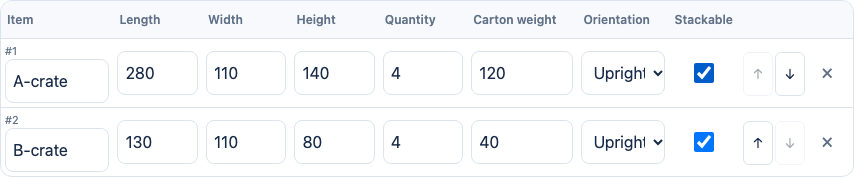
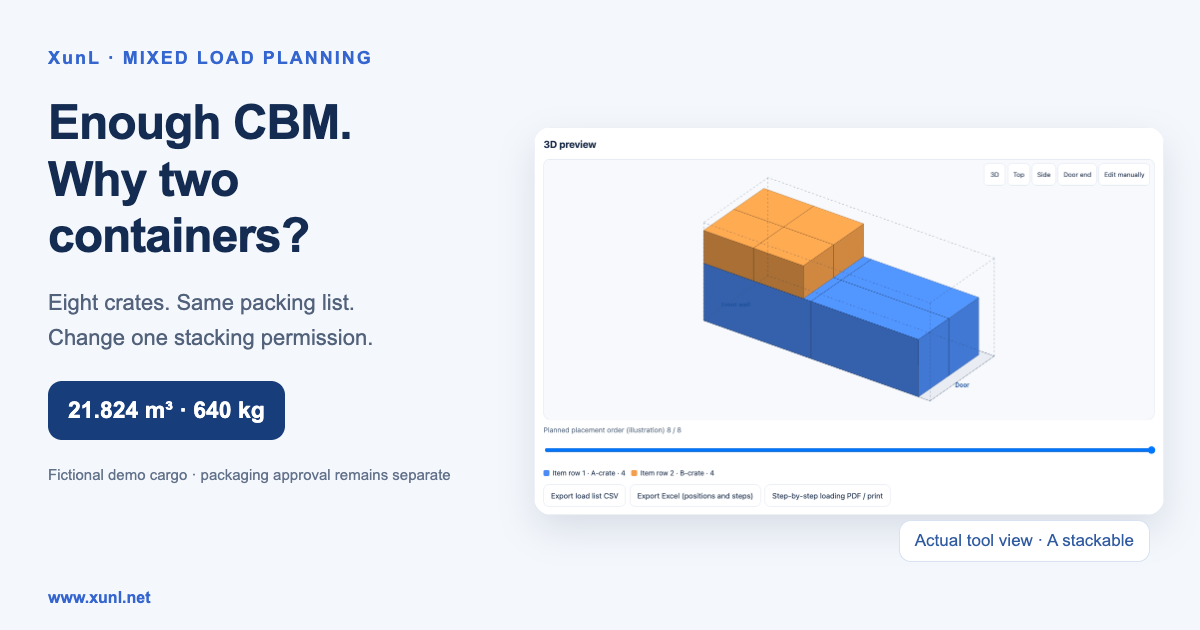
The screenshot shows the second run with A stackable; clear that checkbox for the first run.
Run one: non-stackable A crates require two containers
In the live tool on October 24, 2026, leaving A non-stackable produced this plan:
| Result | Container 1 | Container 2 |
|---|---|---|
| Crates placed | 6: two A + four B | 2: two A |
| Volume fill | 39.8% | 26.0% |
| Gross weight | 400 kg | 240 kg |
The headline “Loaded: 8 cartons” covers both containers together. Read the container count and per-container breakdown before treating the result as a one-container booking.
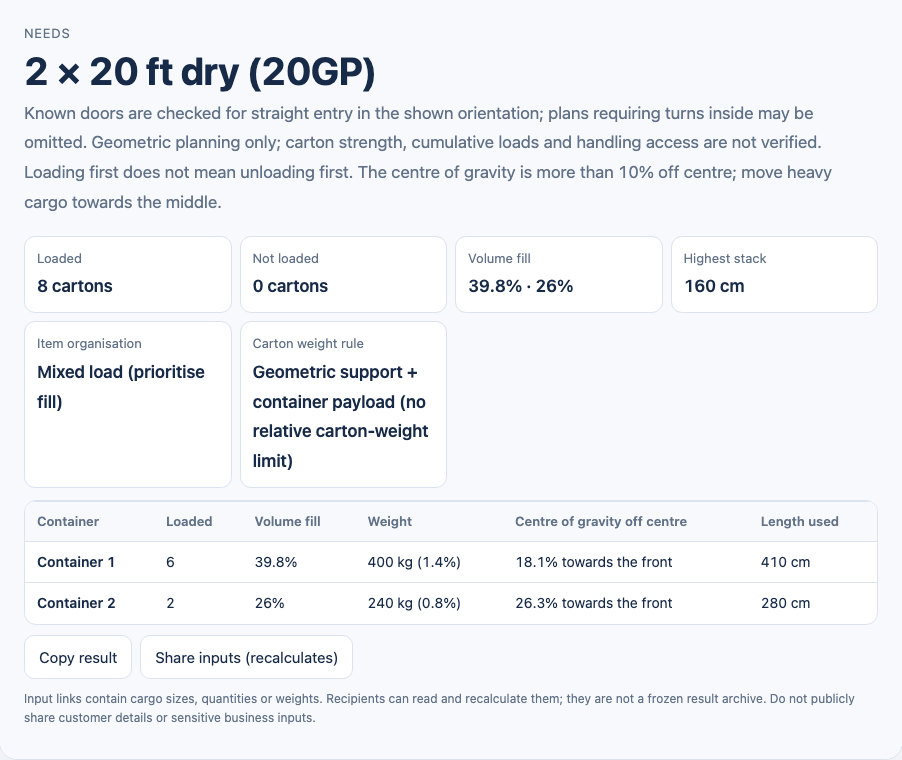
Why does the spare CBM not help? The tool's reference inside dimensions for this 20GP are 589.8 × 235 × 239 cm. Each A crate is 280 cm long, so it cannot be turned across the 235 cm width. Four A crates placed on the floor occupy two rows by two columns, measuring 560 × 220 cm. The approximately 29.8 cm left at the end and 15 cm total spare width cannot accept a B crate's 130 × 110 cm footprint.
B can stack on B, but A's top remains unavailable. The demonstrated restriction prevents simply using the empty space above A. Adding together cargo volumes cannot reveal that loss of usable space.
Run two: approved stacking makes upper space available
After changing A to stackable, the tool placed all eight crates in one 20GP. The actual result was 65.9% volume fill, 640 kg gross weight, 220 cm maximum stack height and 560 cm of container length used.
The four A crates form the lower layer. Four B crates sit over the A crates toward the front wall. A is 140 cm high; adding B's 80 cm height gives 220 cm.
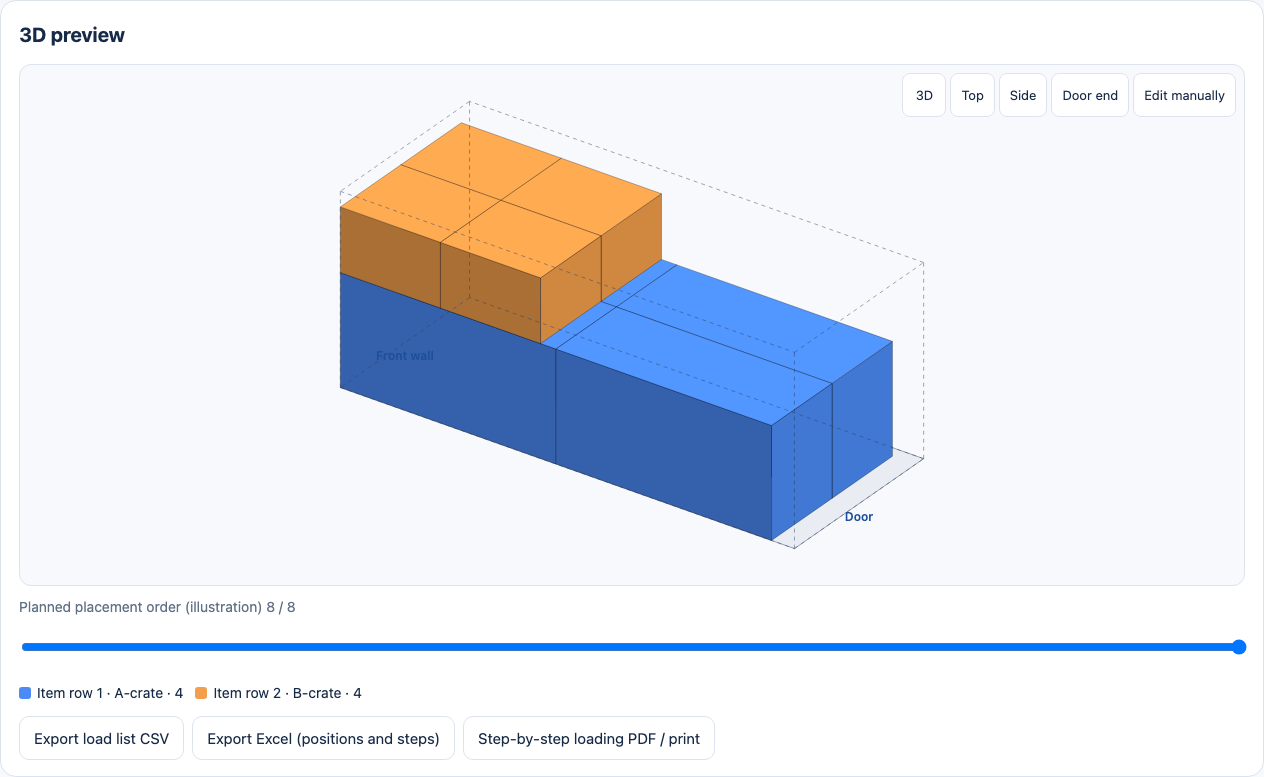
Export the load list CSV to inspect the positions. One B crate starts at X = 130, Y = 110, Z = 140 cm. Its placed dimensions are 130 × 110 × 80 cm, giving end coordinates of 260, 220 and 220 cm. Those values lie inside the reference space, with the complete base supported by A below.
For this example, the exported eight positions were checked for counts, bounds, pairwise overlaps and full base support. That confirms the geometric arithmetic, not physical suitability. One of the front A crates carries two 40 kg B crates above it: whether the package can withstand that 80 kg plus transport forces remains a separate packaging decision. Do not enable stacking solely to obtain a lower container count.
Check an imported Excel packing list before trusting the layout
For a longer order, download the tool's packing-list template and use Import Excel / CSV. After replacing or appending the rows, check:
- Weight meaning. Four crates at 120 kg each should total 480 kg. A row total entered as a per-crate weight would multiply it again.
- Units and outside dimensions. Confirm that centimeters, millimeters or inches were identified correctly. Include packaging and protrusions; distinguish cartons from completed pallets.
- Orientation and top loading. Keep packaging arrows and the shipper's handling instructions. A cargo description by itself does not establish permission to tilt or stack.
- Each container's contents. Review quantities, unplaced crates, payload, center-of-gravity warnings and the 3D view. Consecutive item zones are a separate setting; enabling them can change the container requirement.
Export CSV or the Excel file with positions, and retain the rules alongside the result. The tool also offers a step-by-step report preview and printing. A shared input link contains cargo parameters and recalculates them; it is not a frozen copy of this particular plan. For an auditable decision, retain the export and the packaging version used.
When does a free EasyCargo or Goodloading alternative fit?
XunL can cover a useful task: enter mixed crates, apply basic orientation and support restrictions, inspect a 3D layout and export positions for discussion before booking. The current limit is 20,000 cartons per plan, with a performance warning above 3,000. An eight-crate demonstration does not establish performance for a large commercial list. Check the current tool page for its limits.
Compare the wider workflow before replacing established software. EasyCargo offers a ten-day full-function trial followed by license or day-ticket options, and lists API and SAP integration. Goodloading's FAQ describes a free basic version and PRO features including custom cargo dimensions; its feature page also lists axle-load and multiple-stop planning. Both have a free entry point, so basic load planning should not be described as universally paywalled. These details were checked on October 24, 2026; consult the current terms before purchasing.
If your operation depends on axle calculations, multiple delivery stops, ERP synchronization or centrally managed collaboration, test those as separate requirements. XunL's saved plans and cargo library reside in the current browser on the current device. They do not automatically follow you to another computer and can be lost when browser data is cleared.
Its optional “no heavier on lighter” rule checks directly contacting crates. It does not calculate cumulative loads across several levels or certify carton compression strength. Treat those as separate engineering and packaging checks.
Review the practical loading conditions
The nominal inside dimensions and total payload are only starting inputs. Actual container variation, bulging packages, securing materials, airbags, forklift clearance and handling access need on-site review. The calculator checks a known door for straight entry in the displayed orientation; it does not simulate turning the crate inside. Its heuristic layout is not a promise to find every feasible arrangement or a global optimum.
If you only need cubic volume or chargeable weight, use the CBM and volumetric-weight guide. To answer whether a mixed packing list fits under its handling restrictions, open the container loading calculator, enter a few confirmed cargo lines and check the restrictions before scaling up to the full order.
Put this guide to work for your business
Create a company account to try website monitoring and the inquiry workbench. Compare Pro plans for your team’s ongoing needs.
No card required. The trial returns to Free when it ends. Paid monthly credits are not included in the trial.