A commercial invoice template becomes more useful when its quantities agree with the packing list. Reusing an old spreadsheet can carry the previous buyer, package count or invoice reference into the next shipment. Start with one transaction in the XunL proforma invoice generator, switch document types, and reconcile the actual packing details before exporting.
This walkthrough uses two fictional products. We generated and downloaded the documents, checked the correct result of 36 pieces, USD396.00 and three cartons, then deliberately changed one invoice quantity to show a discrepancy that shared data alone cannot resolve. It also provides a practical way to assess XunL as an IncoDocs alternative for this specific task.
Give each document a clear job
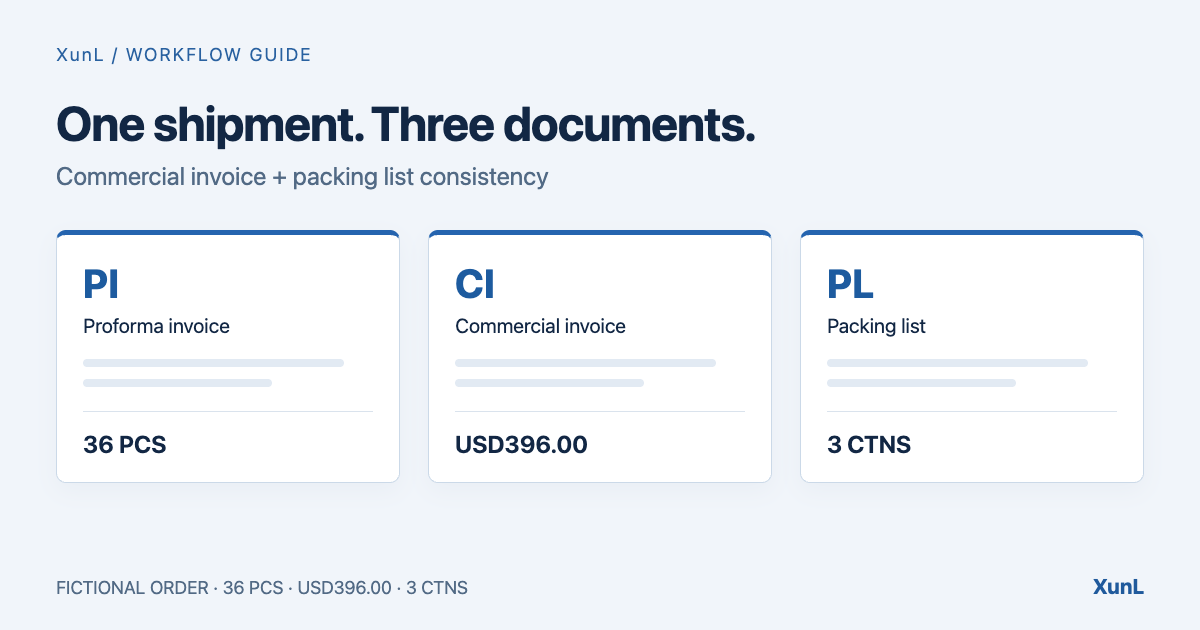
A proforma invoice supports the quotation before shipment. A commercial invoice records the goods sold and the amount payable. A packing list describes packages and their contents, weights, dimensions and marks. It does not replace the commercial invoice; the cargo details should agree across both. The International Trade Administration explains these roles in its common export documents guide. Confirm the actual document requirements with the buyer and freight forwarder or broker.
| Document | Demo number | What to check |
|---|---|---|
| Proforma invoice, PI | DEMO-PI-024 | Parties, products, quantities, prices, currency and agreed terms |
| Commercial invoice, CI | DEMO-CI-024 | Actual shipment quantities and value; PI reference |
| Packing list, PL | DEMO-PL-024 | CI reference, cartons, contents, weights, dimensions and marks |
Renaming a proforma file is insufficient if the actual shipment differs from the quotation. Update the facts first.
Use a small order you can check by hand
The companies, addresses, contacts and products below are fictional. Contact emails use example.com. Bank details, tax IDs and HS codes are blank because the demonstration does not provide them; this is not a recommendation to omit required information in a real shipment.
| Product | Invoice quantity | Unit price USD | Amount USD | Cartons × pieces/carton | Net/gross kg per carton | Outer carton cm |
|---|---|---|---|---|---|---|
| DEMO mounting bracket A | 24 | 12.50 | 300.00 | 2 × 12 | 4 / 5 | 40 × 30 × 20 |
| DEMO mounting bracket B | 12 | 8.00 | 96.00 | 1 × 12 | 2 / 3 | 30 × 20 × 10 |
Freight, insurance and discount are blank and therefore zero in this example. We have not estimated real shipment charges. The invoice should show 36 pieces and USD396.00. Packing should show three cartons, 36 pieces, 10kg net, 13kg gross and 0.054m³. Enter weights per carton: putting the whole row's weight into that field would multiply it by the carton count again.
1. Enter the shared details in the PI
Open the proforma invoice generator. Replace the sample seller and buyer, including their contact fields, then enter the reference, currency, items, quantities and prices. Our PI number is DEMO-PI-024, dated October 24, 2026, with order reference DEMO-PO-024.
The demonstration selects FCA and enters “Demo warehouse, Ningbo” in Named place. The generator appends the Incoterms 2020 version in the document, so it need not be typed again in that field. Use the rule and precise place agreed in your contract; this example does not select a shipping rule for your transaction.
Check the preview: the first line is USD300.00, the second USD96.00 and the total USD396.00. Check the amount in words as well. Our files retain DEMO, Fictional and Demonstration only labels to identify the example.
2. Switch to the commercial invoice
Use the Commercial invoice tab at the top. The parties, products, currency and shipping information carry over. In our run, the Proforma invoice No. field picked up DEMO-PI-024. We set the CI's own number to DEMO-CI-024.
Confirm the actual shipment quantity and agreed price. Review origin, vessel information and shipping marks against this shipment, including any suggested text. An unconfirmed classification cannot be resolved by copying a superficially similar product's HS code.
At this point our packing inputs were still empty, so their totals were zero. Continue to the packing list before treating the invoice as final.
3. Add packing details and recheck the CI
Choose Packing list. Set its number to DEMO-PL-024 and check that Invoice No. references DEMO-CI-024. Enter each row's carton count, quantity per carton, net and gross weight per carton, and outer dimensions in centimetres.
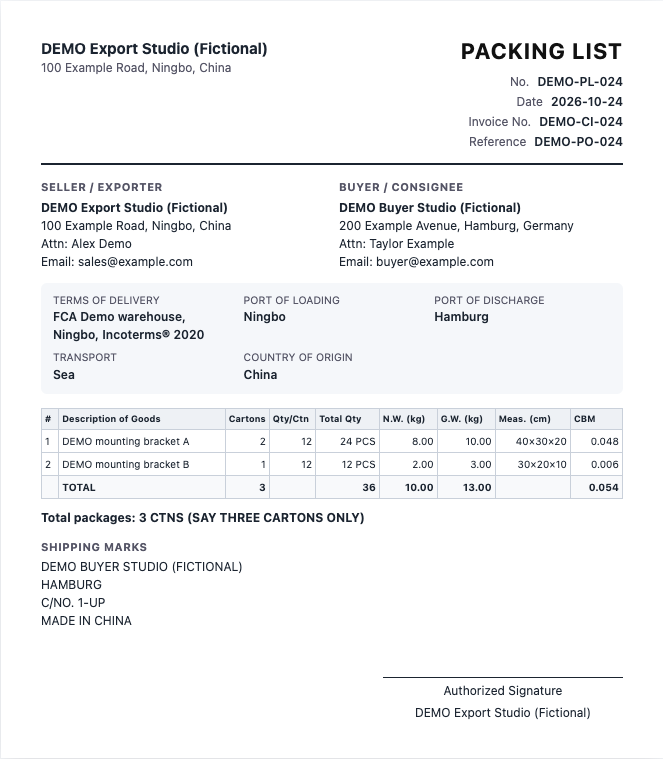
Row A is two cartons of 12 pieces, matching 24 invoice pieces. Row B is one carton of 12. Use measured packing data, and separate cartons with different specifications instead of averaging them into one row.
Switch back to the CI. Our downloaded final invoice showed 36 pieces and USD396.00, plus the packing summary of three cartons, 10.00/13.00kg and 0.054CBM. Each document has its own number and a reference linking it to the relevant earlier document.
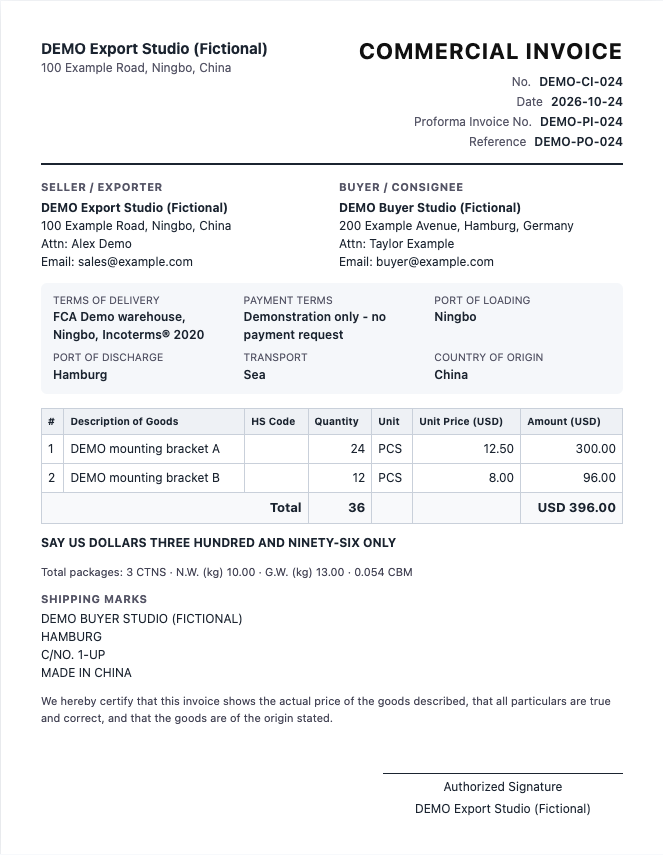
We repeated this workflow in both English and Chinese interfaces on October 24, 2026, downloading PI, CI and PL PDFs and item CSVs. These images show the web previews. All shipment facts in the samples are fictional.
Shared data still needs quantity reconciliation
We then changed only A's invoice quantity from 24 to 30, leaving its packing inputs unchanged. The tool produced:
| Check | Changed result | Explanation |
|---|---|---|
| CI quantity and amount | 42 pieces; USD471.00 | 30 × 12.50 + 12 × 8.00 |
| PL packed quantity | 36 pieces | Still 2 × 12 + 1 × 12 |
| PL cartons, gross weight, volume | 3 cartons; 13kg; 0.054m³ | Packing inputs were unchanged |
Invoice quantity and cartons multiplied by pieces per carton represent different facts. The generator cannot determine where six additional pieces were packed. After a quantity change, split shipment or repacking, update both sets of fields from the confirmed warehouse data and re-export every affected document. We restored the correct 24-plus-12 version after this test.
Choose an export, then check the actual file
Use PDF for a fixed layout, and inspect the downloaded file's parties, references, units, currency, line quantities, total, packing summary and page breaks. Our English-content documents downloaded directly as PDFs in both interfaces; Add Chinese labels was unchecked. For documents containing Chinese, the current tool uses the browser print dialog instead. Choose A4 and Save as PDF, then check glyphs and pagination.
Word and Excel exports support further editing, but changes in those files do not write back into the browser. Excel includes calculation formulas; after changing an amount, also check the amount-in-words text or regenerate the document online. The items CSV is a table export, not a full invoice containing the company details and terms.
To reuse a shipment, save it to the document library and export a full JSON backup from the expandable backup area. Data remains in this browser. Keep a backup before clearing site data or changing devices; local storage is not shared team storage.
Where does it fit as an IncoDocs alternative?
For an individual occasionally preparing these three documents, XunL offers a free workflow without registration, with local generation and files you manage yourself. It addresses the document task shown here.
IncoDocs also has a free plan. Its official pricing page, checked for this article, lists 10 documents per month for one user, alongside paid plans with higher allowances or more users. Compare document volume and collaboration needs rather than assuming every use requires a subscription.
The IncoDocs folder guide describes synced master-file data, shipment attachments and document-set downloads. If a team needs centrally managed shipment records and related files, evaluate that wider service. A local generator is not evidence of a complete replacement.
Before sending, compare the final CI and PL side by side. Match descriptions, units, shipment quantities, packed quantities, marks, buyer and reference numbers. Confirm that both attachments came from the latest revision. Required declarations, classification, signatures and additional documents still need transaction-specific review; a complete-looking PDF does not establish customs acceptance.
Try the commercial invoice generator or packing list generator with this small order first. Reproducing 36 pieces, USD396.00 and three cartons makes unit and quantity errors easier to spot before entering your real shipment.
Put this guide to work for your business
Create a company account to try website monitoring and the inquiry workbench. Compare Pro plans for your team’s ongoing needs.
No card required. The trial returns to Free when it ends. Paid monthly credits are not included in the trial.