A “16-gauge sheet” is not one thickness. Carbon steel, galvanized steel, stainless and aluminum (aluminium in British spelling) use different inch values for the same gauge number, and 6061 and 7075 do not share a density even when the blank is the same size. Treating the sheet metal gauge chart as a universal millimetre thickness, or multiplying aluminum by 7.85, will throw a quote out.
The figures below come from the sheet metal gauge chart, sheet metal weight calculator and aluminum weight calculator as they stood on 17 November 2026. The charts and weights run in the browser. Mass is still theoretical at nominal size. The galvanized gauge changes thickness only; it does not add coating mass.
Why “16 gauge” is not one thickness
The sheet metal gauge chart places four common systems side by side. Higher gauge numbers are thinner, but the inch/millimetre value is not shared across materials. Aluminum alloy designations follow the Aluminum Association system; a gauge number alone does not fix thickness or density:
| System | 16-gauge thickness (in) | 16-gauge thickness (mm) | Density used with that row |
|---|---|---|---|
| Steel, Manufacturers’ Standard Gauge (MSG) | 0.0598 | 1.51892 (the on-page sketch labels this 1.519 mm) | 7.85 g/cm³ |
| Galvanized steel gauge | 0.0635 | 1.61290 | Still 7.85 (thickness only; zinc mass is not added) |
| Common stainless sheet gauge | 0.0625 | 1.58750 | 7.93 if you take 304 |
| Aluminum, Brown & Sharpe / AWG | 0.0508 | 1.29032 | The chart’s default aluminum is 5052 at 2.68 |
The chart places aluminum and copper on the same Brown & Sharpe thickness column. That only means the inch value is shared at a given gauge. Mass still needs the matching density (copper is 8.89 g/cm³ in the metal weight tool); do not weigh a copper sheet at 2.68.
For ten 4 ft × 8 ft sheets (1219.2 × 2438.4 mm), the sheet metal weight calculator with those thicknesses and densities gives:
- MSG 16 carbon steel: 35.447 kg each, 354.47 kg for ten (11.924 kg/m²)
- Galvanized 16 at 7.85: 37.641 kg each, 376.41 kg for ten
- Stainless 16 + 304 (7.93): 37.425 kg each, 374.25 kg for ten
- Aluminum 16 + 5052 (2.68): 10.28 kg each, 102.8 kg for ten
The same “ten 4×8 sheets, 16 gauge” therefore differs by a factor of about 3.4 between carbon steel and 5052 aluminum. The chart can also take a measured thickness and return the nearest gauge, so you do not have to describe a millimetre reading as “about 16 gauge”.
When the sheet-metal weight calculator opens, the pre-filled thickness is 1.519 mm (MSG 16 rounded from 1.51892 mm). Ten sheets at that rounded default weigh 354.49 kg, versus 354.47 kg at 0.0598 in × 25.4; they agree at display precision. On a quote, name the gauge system and the inch thickness rather than writing only “16 ga”.
Aluminum also depends on the alloy, not just thickness
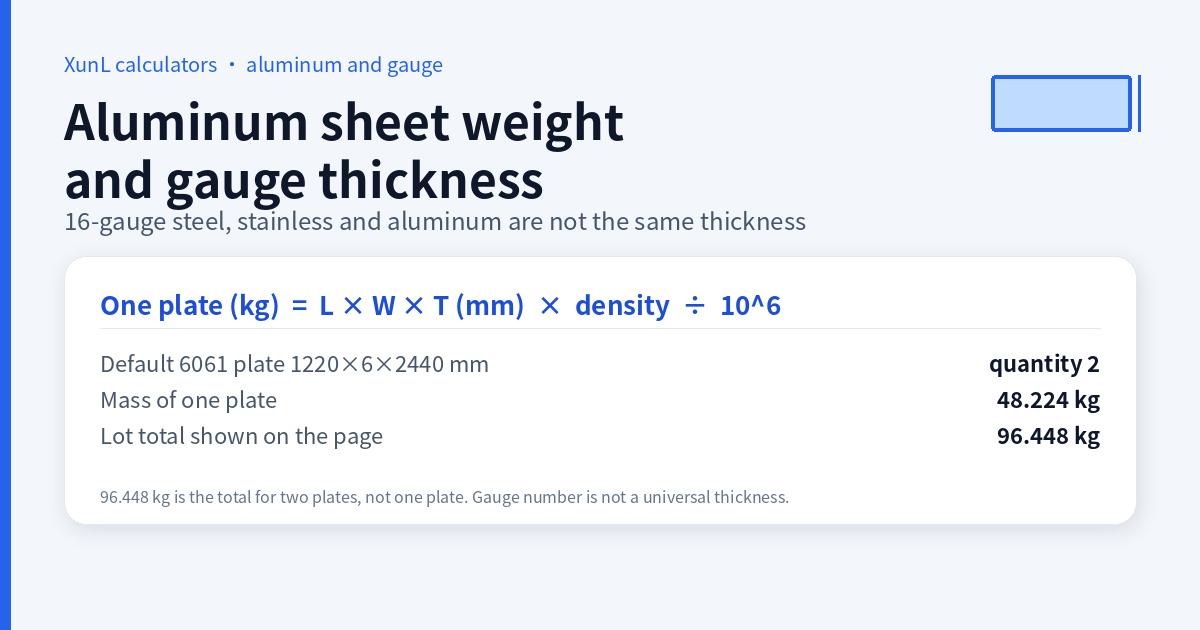
The aluminum weight calculator does not open on carbon steel. It opens on a 6061 plate, 1220 × 6 × 2440 mm, with a default quantity of 2, density 2.70 g/cm³. The large “total weight” on the page, 96.448 kg, is the mass of both plates, not one plate; one plate is 48.224 kg. The plate formula is unchanged:
One plate (kg) = length × width × thickness (mm) × density ÷ 10⁶
- Mass per square metre = 6 × 2.70 = 16.2 kg/m²
- One plate = 1220 × 2440 × 6 × 2.70 ÷ 10⁶ = 48.224 kg
- Two plates (the total weight) = 96.448 kg
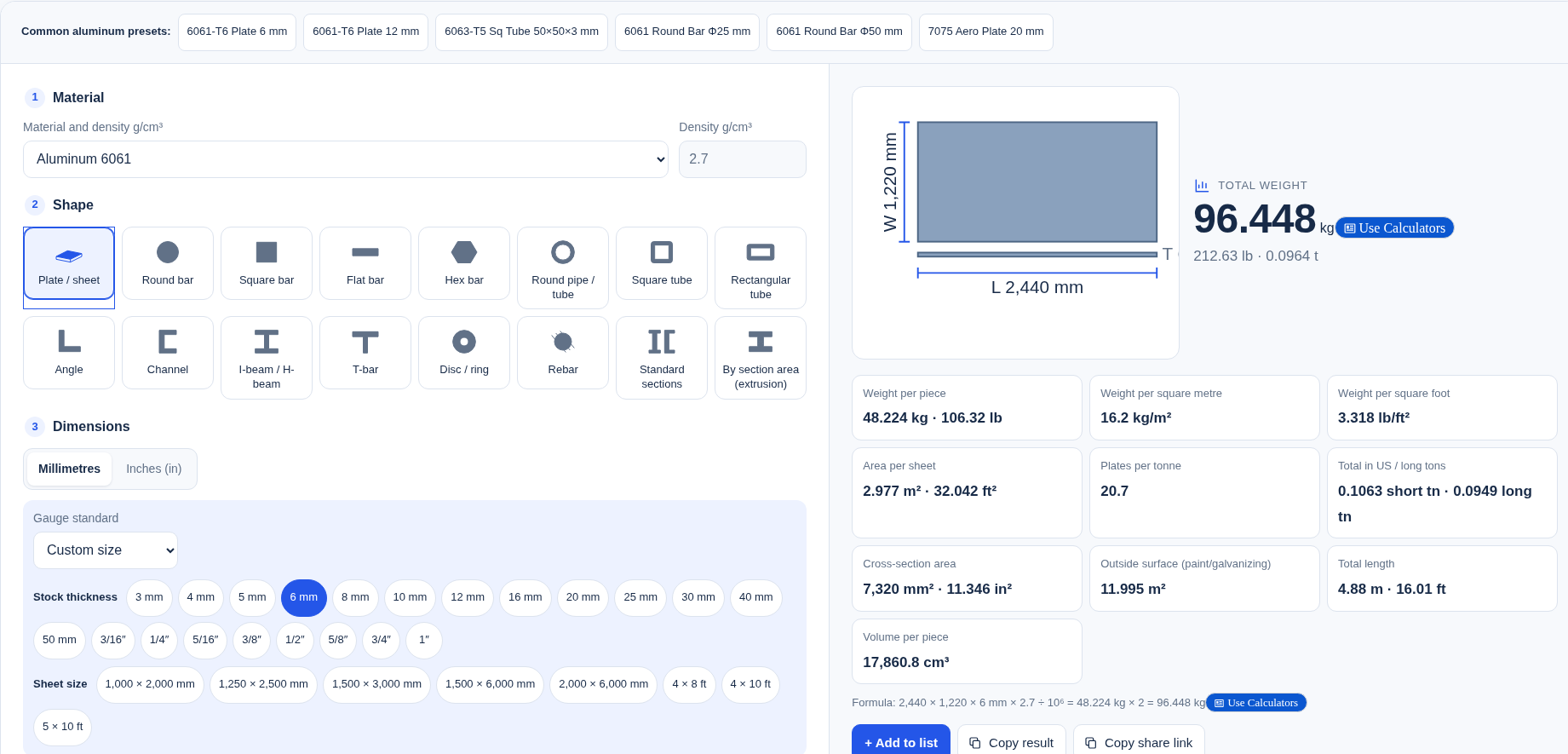
Switch the alloy to 7075 (2.81 g/cm³) and keep the blank: one plate is 50.189 kg and the pair is 100.38 kg, about 4% heavier. The tool also lists nominal densities for 1100 (2.71), 3003 (2.73), 5052 (2.68), 5083 (2.66) and 6063 (2.69). Do not keep 2.70 when the job is marine 5083 or a 7xxx plate.
The same 1220 × 6 × 2440 mm plate calculated as carbon steel at 7.85 would be 140.21 kg — about 2.9 times the 6061 mass. That is why aluminum blanks should not inherit the default steel density. The pages state that these are nominal densities for common grades, and that you can type a custom value.
The aluminum tool can also be switched to bar and tube sections, with shortcuts such as 6061 plate, 6063 square tube and 7075 plate. Those are extrusion or bar problems, separate from thin sheet bought by gauge.
How the two tools work together
Use the gauge chart first to lock the system, the gauge number and the inch/millimetre thickness, or to work backwards from a measured thickness. Then pass the thickness and the matching density into the sheet metal weight calculator or the aluminum weight calculator. Carbon-steel plate, round bar, rebar and IPE sections belong in theoretical steel weight, not in a second 7.85 worked example here. Pipe NPS and schedule are not gauge numbers either — see pipe NPS and schedule.
Put this guide to work for your business
Start free tools with Google or an email code. Create a company and compare Pro plans when you need monitoring and team permissions.
Personal accounts use Free limits. A separate new company receives a 7-day Pro trial, excluding paid monthly credits.