Retail packs usually carry an EAN-13 or UPC-A: a fixed-length number whose last digit is a check digit. Internal warehouse SKUs and lot codes more often use Code 128, which can include letters and does not use that retail check. XunL’s barcode generator defaults to Code 128. For a North American shelf mark, use the UPC barcode generator, which defaults to UPC-A. Both pages share the same generator, draw the symbol in the browser, and state that there is no watermark.
The numbers below were checked on 17 November 2026 on the barcode generator and the UPC barcode generator, using the on-page samples or the inputs written here. Drawing a symbol in the tool is not the same as being issued a GS1 company prefix or a product number, and it is not the same as being assigned an ISBN. A check digit only tests the arithmetic of the digits you typed. It does not prove the number is registered, that every scanner will accept the print, or that the prefix is a country of origin. The same workbench can also draw QR codes and other 2D symbologies; this article stays on 1D retail and SKU codes. If you need to change the destination of a QR code that is already in print, see Change a QR Code Destination After Printing.
EAN-13: a 12-digit body, then the tool adds the check digit
The EAN-13, UPC-A and ISBN samples in this article are demonstration only; generating this example does not assign or license a GTIN/ISBN to you. Do not use the sample identifiers on real products. We have not looked these numbers up in a GS1 or ISBN registry, so we also do not describe them as unassigned or fictional.
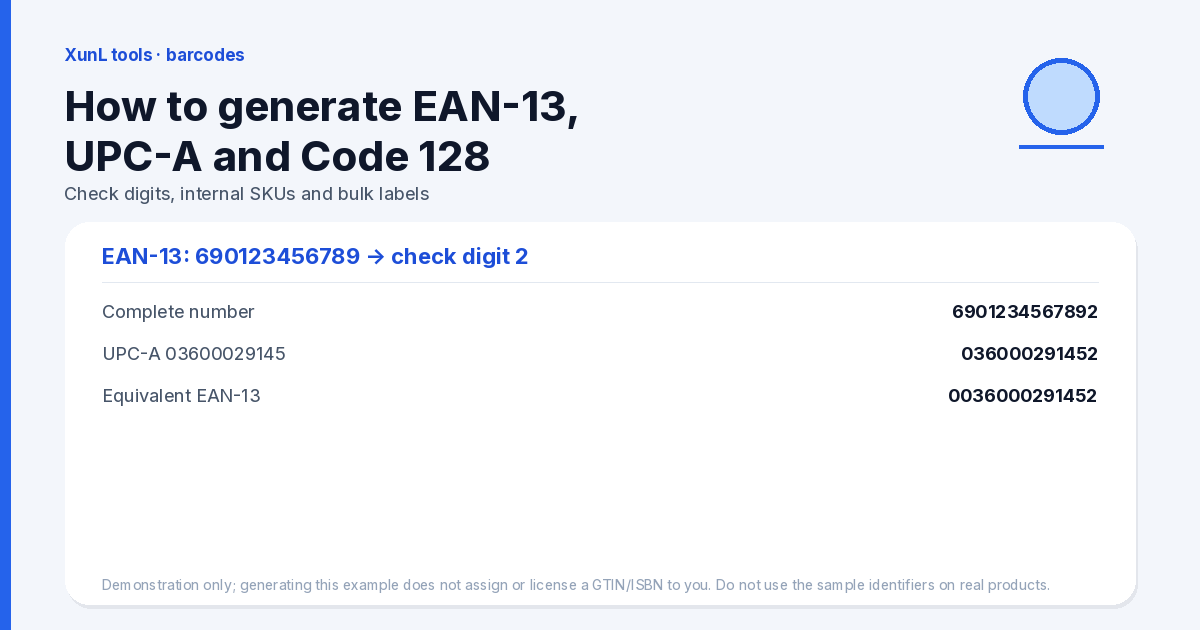
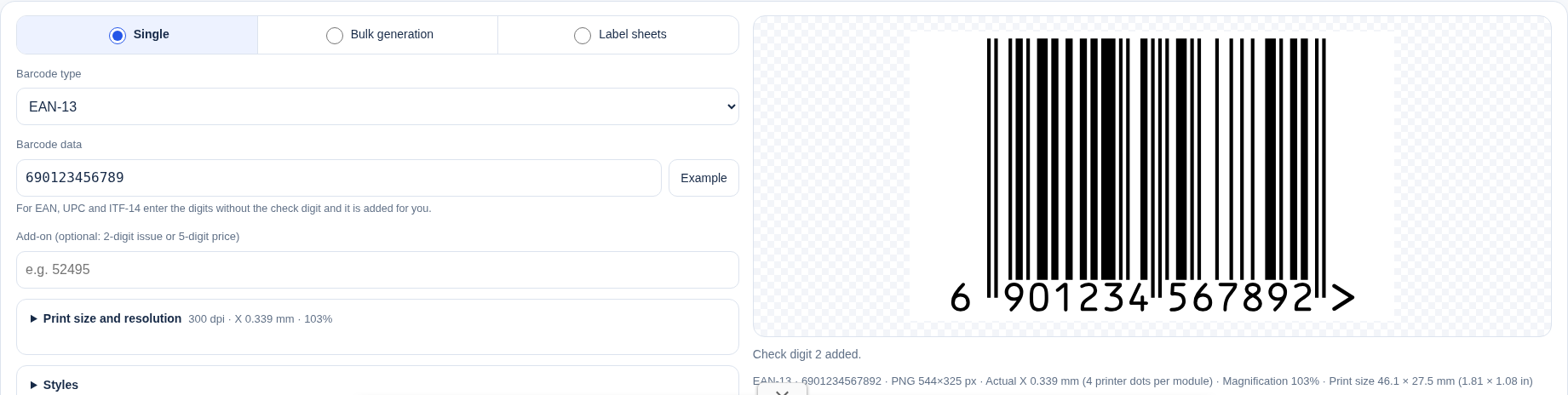
Open the barcode generator, set the type to EAN-13, and enter the sample 690123456789 (12 digits, no check digit). The tool adds GS1 modulo-10 check digit 2, so the complete number is 6901234567892. The on-page walk-through matches this (from the right, positions 1, 3, 5, … are multiplied by 3):
- Weighted digits: 6×1 + 9×3 + 0×1 + 1×3 + 2×1 + 3×3 + 4×1 + 5×3 + 6×1 + 7×3 + 8×1 + 9×3
- The sum is 128. The next multiple of 10 is 130, so the check digit is 130 − 128 = 2
Prefix 690 is a GS1 China office number range. It is not a mark of origin. A 690 barcode does not mean the goods were manufactured in China.
If you paste the full 13 digits, including the check, the tool verifies the last digit and will warn you when it is wrong rather than silently drawing a bad retail symbol. The page also accepts a hyphenated ISBN sample, 978-7-111-54742-6. Demonstration only; generating this example does not assign or license a GTIN/ISBN to you. Do not use the sample identifiers on real products. Applying for or being assigned an ISBN is a separate registration step, and this generator does not do it.
UPC-A: an 11-digit body, and the EAN-13 form is a leading zero
North American shelves more often use UPC-A. Open the UPC barcode generator. The default type is UPC-A and the sample is 03600029145 (11 digits). Demonstration only; generating this example does not assign or license a GTIN/ISBN to you. Do not use the sample identifiers on real products. The tool adds check digit 2, giving 036000291452. The same modulo-10 arithmetic: the weighted sum is 58, the next multiple of 10 is 60, and the check digit is 2.
The equivalent EAN-13 is the UPC-A with a leading zero: 0036000291452. The check digit does not change. Prefix 003 belongs to a GS1 US range and, again, is not proof of origin.
Do not paste a complete 12-digit UPC-A into an EAN-13 field that expects a 12-digit body and ask the tool to compute a new check digit — the length will not line up. For the 13-digit form used in many other markets, use “0 + the complete UPC-A”.
Internal SKUs: the default Code 128
Back on the barcode generator, the default type is Code 128 and the sample is XUNL-2026-0001. This symbology allows letters, digits and common separators. It does not auto-generate a GS1 check digit, and the text has no retail-prefix meaning. The page caps content at 80 characters.
Code 128 is a fit for bin locations, lots and self-assigned SKUs. It is not a substitute for the EAN-13 or UPC-A already on a sellable product: checkouts and marketplaces usually need the registered retail number, not a warehouse code. The page also notes that Amazon FNSKU-style codes are often drawn as Code 128, but the length and prefix are whatever Seller Central requires at the time — do not treat the internal SKU sample as a marketplace label specification.
Bulk lists, sequences and label sheets
The same workbench can generate in bulk. That is not a separate “bulk barcode engine”. Each list line uses the format number,quantity,text1,text2, and you can import CSV or TXT. You can also generate a sequence: the page defaults to start SKU-0001, count 20, step 1. Label-sheet layout and a default of 300 dpi are on the same page. Print at 100% actual size and keep the quiet zone on both sides of the bars. Do not scale the symbol or crop the quiet zone, or the bar width and scanning distance will be off. This article does not give a blanket no-margins rule: margins depend on the label stock and the printer.
Bulk generation only speeds up drawing. It does not issue registered retail numbers. The SKU- prefix in the sequence sample is an internal-code style, not an EAN or UPC.
What this page will not do for you
- It will not apply to GS1 for a company prefix or item number, and it will not obtain an ISBN from any agency.
- It will not certify that a given scanner, marketplace or print run will read the image; the check digit only checks the arithmetic.
- A prefix is not a country of origin.
- This article does not teach QR codes. To change the destination of a printed QR code, use the dynamic-QR note linked above rather than this 1D tutorial.
Put this guide to work for your business
Start free tools with Google or an email code. Create a company and compare Pro plans when you need monitoring and team permissions.
Personal accounts use Free limits. A separate new company receives a 7-day Pro trial, excluding paid monthly credits.