Markup and margin are often treated as the same percentage, but they use different denominators. Markup is divided by cost; margin is divided by selling price. So when cost is 100 and price is 150, markup is 50% and margin is only about 33.33%. Percentage change and percentage difference are a third family of questions: one uses the original value as the base, the other uses the mean of the two values. Neither is a substitute for margin.
The figures below were checked on 17 November 2026 on the margin calculator, markup calculator and percentage calculator, and on the more focused percentage change calculator and percentage difference calculator. The margin page can solve for the rest of cost, price, margin, markup and profit from any two of those inputs. It computes the full-precision result, then rounds for display and strips trailing zeros. The percentage pages default to 2 decimal places. All of this arithmetic runs in the browser.
Cost 60, price 100: separate the two rates first
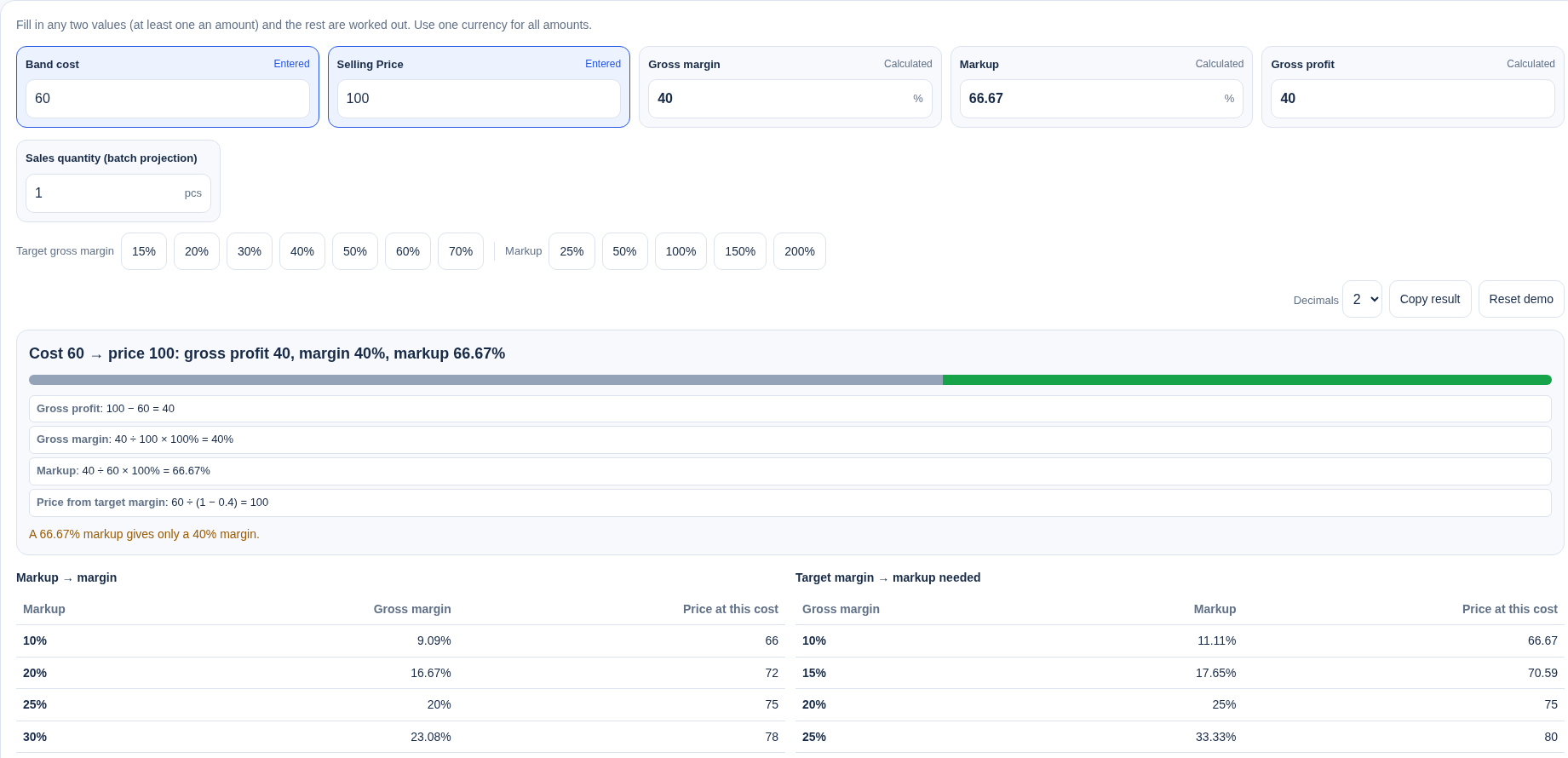
Open the margin calculator, set cost to 60 and price to 100 (any one currency is fine; no conversion is required):
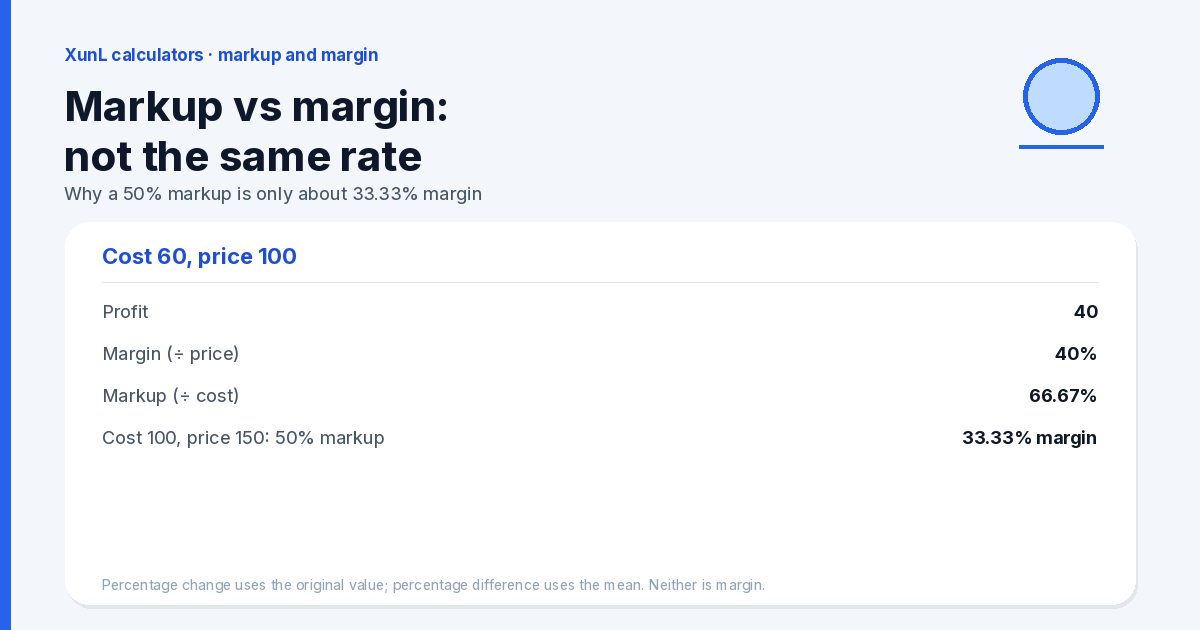
- Profit = 100 − 60 = 40
- Margin = 40 ÷ 100 = 40% (the page shows 40, not 40.00)
- Markup = 40 ÷ 60 = 66.666…%, and the page shows 66.67%
Do not reconstruct profit or price from the displayed 66.67%. The unrounded intermediate is 40 ÷ 60. A 40% margin is not the same thing as a 40% markup.
Price from a 40% markup — the margin is not 40%
Open the markup calculator, choose Cost + markup → price (the page default), and enter cost 50 and markup 40%:
- Price = 50 × (1 + 40 ÷ 100) = 70
- Profit = 20
- Margin = 20 ÷ 70 = 28.5714…%, shown as 28.57%
- The multiplier from cost to price is 1.4
When this page is in cost + markup mode, unused boxes such as price or margin may still be visible and can hold leftover values that do not belong to the current case (for example a price of 80 and a margin of 30, which contradict the figures above). Read only the inputs for the mode you are using. Do not treat every number on the screen as one worked example.
The tool shows this note: “Markup is based on cost and is not the same as margin (see the margin result). If your target is a margin, choose ‘Cost + target margin’.” If you add tax, it is applied on top of the pre-tax price. If the shelf price already includes VAT, divide that out first, then compute markup or margin. The calculator uses the unit cost you type; it does not allocate unallocated fixed overhead.
Why a 50% markup is only about 33.33% margin
The same relationship can be written: if markup is m%, then margin = m ÷ (100 + m) × 100%. On the margin calculator, enter cost 100 and price 150 (a 50% markup):
- Profit = 50
- Markup = 50 ÷ 100 = 50%
- Margin = 50 ÷ 150 = 33.333…%, shown as 33.33%
Conversely, a 40% margin target requires a markup of 40 ÷ 60 × 100 = 66.666…%, about 66.67%, not 40%. That is the same relationship as the cost-60, price-100 case above.
Percentage change and percentage difference are not margin
A price moving from 80 to 100 is percentage change (an increase), not margin. The page defaults to original 80 and new 100:
- Amount of change = 20
- Increase = 20 ÷ 80 = 25%
The same pair in reverse, 100 down to 80, is a −20% change, because 20 ÷ 100 = 20%. A 25% rise followed by a 20% fall returns to the start: the bases are different, so the percentages are not additive.
Percentage difference is a different card, and it has its own percentage difference calculator. The default inputs are 10 and 20. The base is the mean of the two absolute values: the mean is 15, and the difference is |20 − 10| ÷ 15 = 66.666…%, shown at the default 2 decimal places as 66.67%. That is not “20 is 100% more than 10” — that would be a change with 10 as the original value. A less confusing pair: 80 versus 100 has a percentage difference of |100 − 80| ÷ 90 = 22.222…%, shown as 22.22%. That is neither the 25% increase nor the 20% decrease.
Share-of questions should not be forced into a margin formula either. For example, 15% of 200 is 30; 200 minus 15% is 170. 200 plus 15% is 230 in exact arithmetic, and the page shows 230 at 2 decimal places. You can check these on the percentage calculator.
What these calculators will not do for you
- They will not fold unallocated rent, payroll or other fixed costs into the unit cost. To see the volume at which a product breaks even, use the separate break-even calculator rather than stuffing overhead into margin.
- Margin here is product margin on selling price, not operating margin, after-tax profit, or a similarly named figure in a marketplace dashboard that may use another definition.
- They do not handle multi-period compound growth, loans or investment returns; those are out of scope for the percentage tools.
- Leftover values in unused boxes on the markup page are not one consistent worked example.
Put this guide to work for your business
Start free tools with Google or an email code. Create a company and compare Pro plans when you need monitoring and team permissions.
Personal accounts use Free limits. A separate new company receives a 7-day Pro trial, excluding paid monthly credits.