A one-line API response needs more than indentation: it needs valid syntax, readable structure and unchanged values. Start with the JSON formatter and viewer. Use the XML, YAML or CSS tools only when that is the language you actually have. Formatting a stylesheet does not validate a product feed, and pretty JSON does not establish that an order is correct.
This guide uses the public JSON workbench documentation and related tool pages reviewed on 18 November 2026 (Asia/Shanghai). The captured sample below is supported by the browser worker’s input/output log and separate English and Chinese originals; other capabilities remain attributed to the documentation.
Format, minify or inspect: choose the job first
| Your task | Start here | What to check next |
|---|---|---|
| Read a compressed API response | JSON: Format | Types, nested fields and numeric literals |
| Send compact JSON | JSON: Compress | Same values; fewer insignificant spaces |
| Find a deeply nested field | JSON structure tree and JSON Pointer | The selected path and its value |
| Read sitemap or feed XML | XML formatter | Well-formedness, not XSD validity |
| Tidy configuration indentation | YAML formatter | Application schema separately |
| Read CSS, SCSS or Less | CSS formatter | Actual browser rendering separately |
| Reduce a CSS delivery file | CSS minifier | Cascade and visual regression tests |
Keep an untouched copy. For JSON, use the dedicated workbench when you need its tree, comparison or CSV workflow; the multi-language code beautifier is a different, shared formatting interface. It can detect languages, but short or mixed snippets may need a manual selection. Do not assume every language supports minification: its documented engine table does not offer YAML minification.
Start with strict JSON, not a JavaScript object
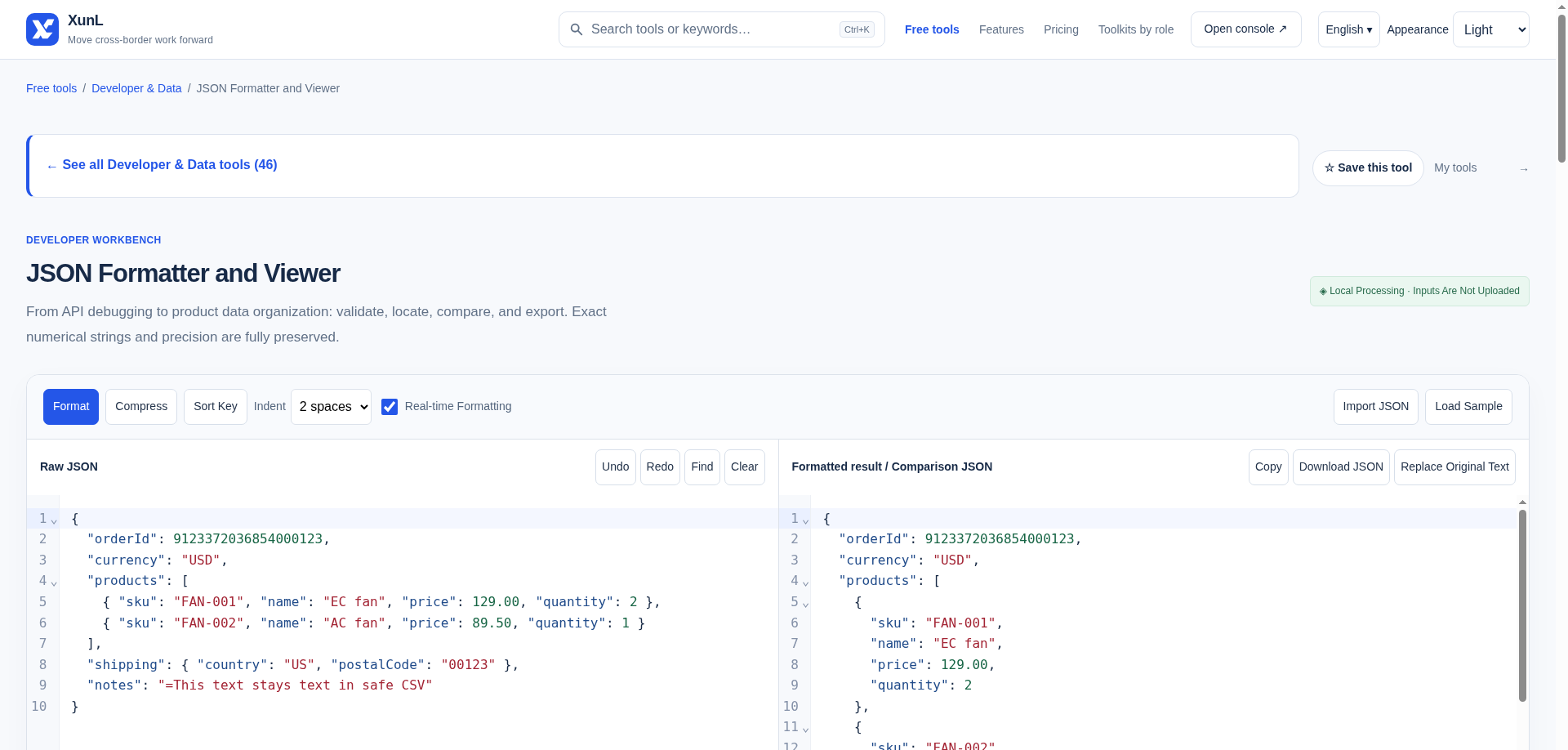
The captured workflow used Load Sample, accepted the replace-content confirmation, then selected Format. Both language pages supplied this input:
{
  "orderId": 9123372036854000123,
  "currency": "USD",
  "products": [
    { "sku": "FAN-001", "name": "EC fan", "price": 129.00, "quantity": 2 },
    { "sku": "FAN-002", "name": "AC fan", "price": 89.50, "quantity": 1 }
  ],
  "shipping": { "country": "US", "postalCode": "00123" },
  "notes": "=This text stays text in safe CSV"
}
The worker log records “Strict JSON valid · No duplicate keys found” and “Right strict JSON valid · Original numeric literals preserved”. The formatted right panel expands the product objects across lines while keeping 9123372036854000123, 129.00 and 89.50 as written. The input status shows 334 bytes, 18 values and 3 nesting levels; the logged formatted output is 400 bytes. Formatting is for readability, not making a file smaller. For field inspection, open the first product in the tree. For a compact delivery version, use Compress after resolving errors. Neither action should be used to decide whether the price or stock data is right.
Under RFC 8259, property names and string values need double quotes. Comments, trailing commas, single-quoted strings, NaN, Infinity and hexadecimal number notation are not strict JSON. For example, {"sku":"00042",} has a trailing comma; remove that comma rather than hoping indentation will repair it. A top-level value need not be an object: an array, string, number, boolean or null can also be JSON.
There is an important distinction with duplicate keys. RFC 8259 says object names should be unique; parsers disagree about duplicates. XunL documents a stricter workbench policy: repeated keys in the same object are validation errors, located at the second occurrence. The same sku key in two separate product objects is normal. A valid document still needs separate checks for required fields and business rules. In the worker’s separate English strict-validation check, input {"a":1,} produced the message “Strict JSON does not allow trailing commas.” at line 1, column 8, with no formatted result.
Find a field with JSON Pointer, not JSONPath
The documented tree workflow lets you select fields, locate original text and copy a JSON Pointer. In the sample above, /products/0/sku addresses the first product’s sku: array indexes start at zero. This path explanation follows RFC 6901, not an observed click result.
If a key itself contains /, encode that character as ~1 in its pointer token; use ~0 for a literal ~. These escapes are not URL percent-encoding. JSONPath wildcards and filters are not supported by this pointer field. Copy a precise pointer when handing an error to a colleague rather than saying “the SKU near the bottom”.
Large integers: check the digits, not just the indentation
Identifiers can look numeric without being quantities. The JSON page documents preservation of numeric literals such as 9123372036854000123, 2.370 and 2.3e500 using lossless-json. The captured formatting run verifies the sample’s large order ID and decimal spellings, not every possible numeric literal or export path. Ordinary number parsing elsewhere in a workflow may still round a large integer or normalize a decimal.
The sample’s postal code "00123" is a string: keep it that way when the leading zeros are part of the identifier. Changing it to a number changes its type and loses that identifier representation. Do not silently change an API contract, though: whether an ID is a number or string belongs in the schema agreed with the receiver.
For comparison, the page documents that object key order is ignored, arrays are compared by index, and numeric literals are compared as written: 1 and 1.0 are distinct in this diff. That can reveal serialization changes; it is not a claim that those literals represent different mathematical values.
CSV needs another check. The documented export supports objects or arrays of objects, with optional flattening by JSON Pointer. CSV has no column types: import identifier columns as text in your spreadsheet. The workbench’s formula-prefix protection does not make CSV a lossless JSON backup. Retain the JSON original.
XML, YAML and CSS: similar layout problem, different limits
XML: use the XML formatter for matching tags, nesting, one root and quoted attributes. The page describes well-formedness checks, not XSD or DTD validation. Its documentation also warns about mixed content and whitespace-sensitive documents. Review those carefully before replacing an original; indentation can matter when text and child elements are interleaved. For multilingual HTML pages rather than XML feeds, the HTML translation SEO checklist covers a separate publishing workflow.
YAML: the formatter documents space-based indentation, comments and document separators. A clean parse does not validate a Kubernetes or application schema. Keep indentation deliberate, and quote strings where YAML could interpret punctuation or values differently from your intent. Do not infer YAML support from generic JavaScript-oriented options shown by a shared workbench.
CSS: beautification is for reading declarations and nesting. Minification is for a delivery copy: the CSS minifier documents CSSO transformations such as removing whitespace and merging rules. Do not promise a fixed saving or faster page from a short example. Keep source styles, review options and test the rendered page, especially overrides and responsive states. Formatting SCSS or Less is not compiling it into browser-ready CSS.
The worker also tested the same built-in CSS sample in the English formatter and minifier. The formatter kept #dddddd and #ff0000; the minified output used #ddd and red. That is a specific example of rewriting values, not merely deleting line breaks. It does not establish a general saving or prove every stylesheet is safe to deploy.
Before copying the result
- Resolve syntax and duplicate-key problems before sorting or comparing.
- Inspect types, exact identifiers and a representative nested field.
- Choose readable JSON, compact JSON or analysis CSV for the next consumer—not interchangeably.
- Respect the dedicated JSON page’s documented input limits: 1 MiB, 100,000 values and 128 nesting levels. Other formatter pages document different limits; do not apply their 5 MB allowance to JSON.
- Remove secrets and customer data before using examples. The JSON page says processing stays in the browser and optional drafts use localStorage; that is not a claim that the whole website makes no network requests. Site advertising still follows the site-wide configuration. Leave draft storage off on shared devices.
Put this guide to work for your business
Start free tools with Google or an email code. Create a company and compare Pro plans when you need monitoring and team permissions.
Personal accounts use Free limits. A separate new company receives a 7-day Pro trial, excluding paid monthly credits.