A buyer sends a WhatsApp voice note, you record a spoken brief at a trade show, or you want a written record of a call. What you need is that speech as text you can edit and translate. XunL speech to text runs OpenAI's open-source Whisper model inside your browser: record directly or drop in an audio file, the audio is never uploaded, and the transcript can be edited, copied or translated into several languages at once.
Below are our results from two test recordings, including where it does well and where a human still has to proofread.
How to use it
- Click "Start recording" and speak, or drop an MP3, WAV, M4A, WebM or OGG file (up to 60 minutes). Alt + R starts and stops recording.
- Pick a model: Tiny (42 MB, fastest), Base (76 MB, recommended) or Small (240 MB, most accurate, needs a strong PC). On first use, a pinned version of the model files downloads from Hugging Face and is cached on your device.
- The spoken language can be detected automatically or chosen; Chinese, English, Japanese, Spanish, German and many more are listed.
- Compute defaults to "Auto (WebGPU first)" and falls back to WebAssembly (CPU) without graphics acceleration.
Test 1: English recording, Base model
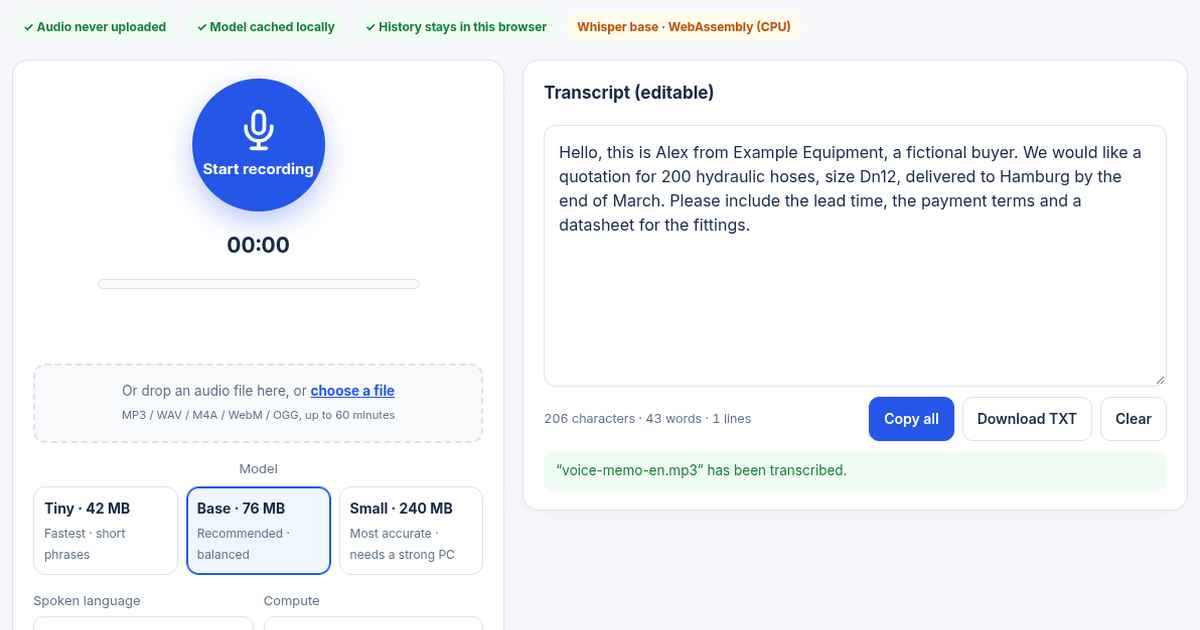
We generated a fictional English quotation request with an open-source speech synthesiser and transcribed it with the Base model on WebAssembly (CPU):
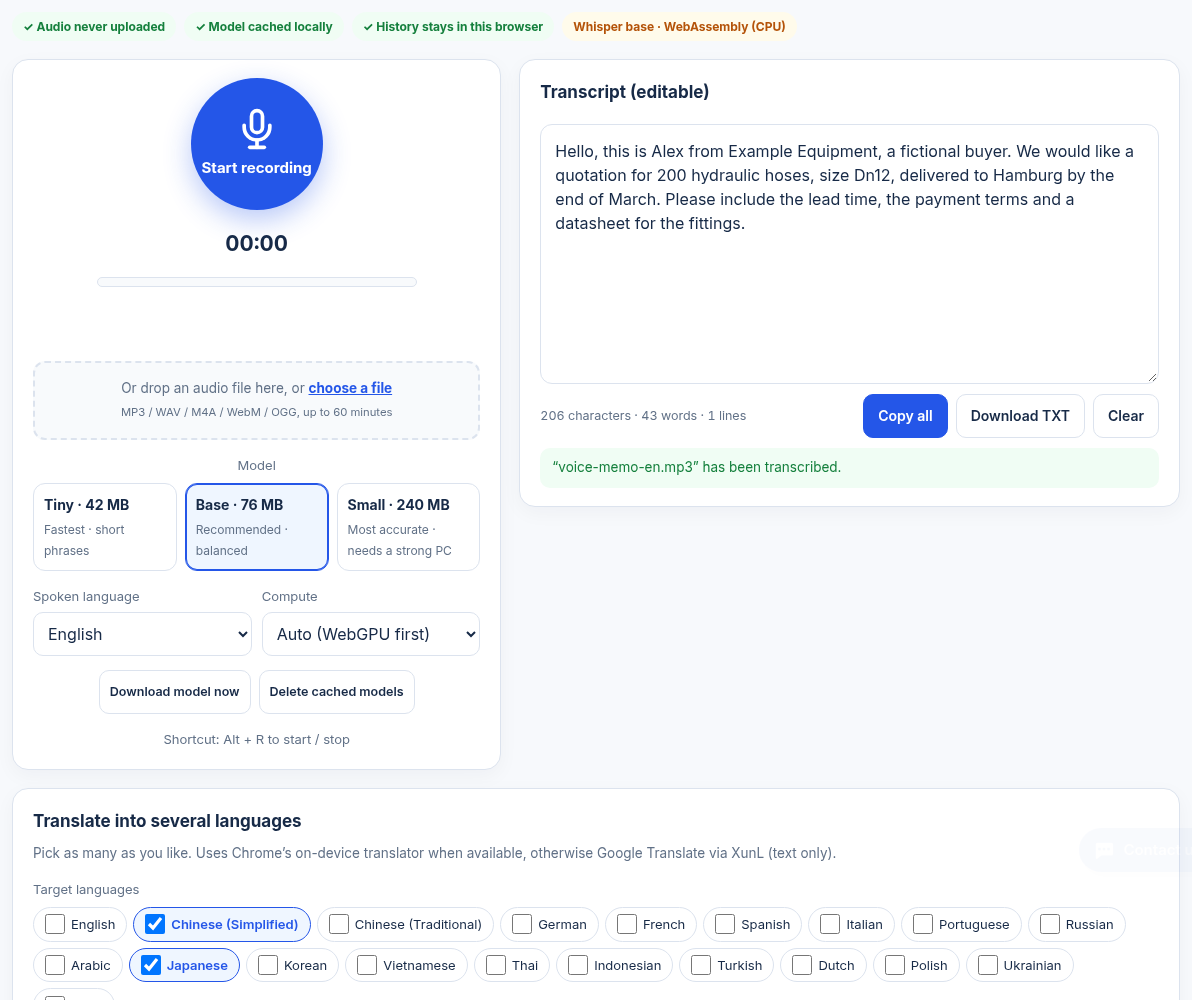
The transcript matched the script almost exactly. Quantities, size, city and month were all correct; only "DN12" came out as "Dn12".
Test 2: Chinese recording, Small model
The same message in Chinese, with the larger Small model, got the numbers ("200", "12", "end of March") and "Hamburg" right, but made many homophone errors: "inquiry" (询价), "hydraulic" (液压), "lead time" (交货期), "payment" (付款) and "fittings" (接头) were each written with wrong characters that sound similar, and there was no punctuation.
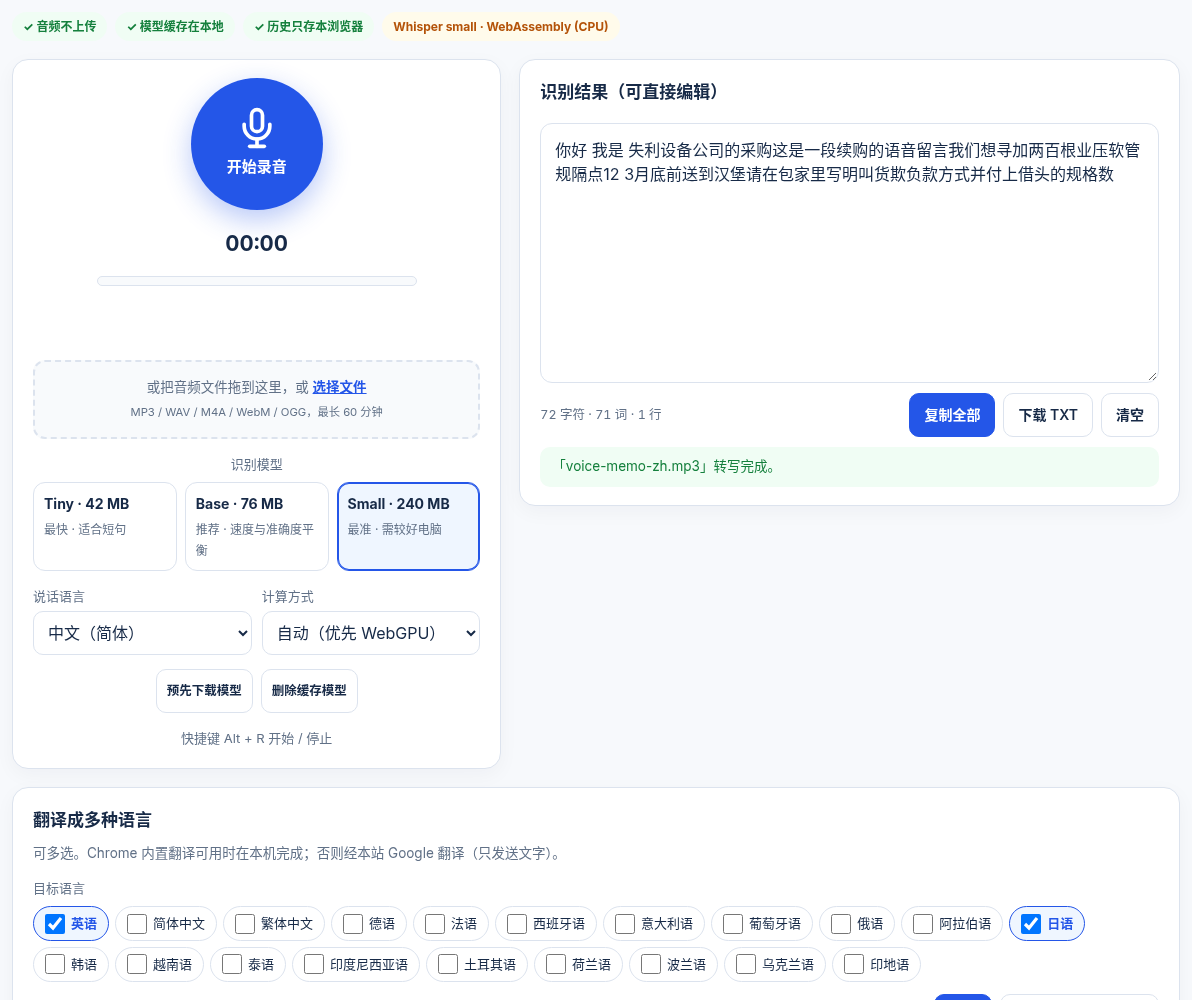
These were synthetic voices, not people; real recordings vary with accent, noise and microphone. The conclusion is still clear: proofread technical terms, especially product names, sizes, quantities and lead times, and be extra careful with Chinese.
After transcription: edit, translate, hand off
- Edit the transcript in place, then copy it or download a TXT file.
- "Translate into several languages" lets you tick multiple targets. Chrome's on-device translator is used when available; otherwise, only after you click Translate, the text (never the audio) is sent to XunL's Google Translate service.
- For longer text or HTML, "Open in the full translator" takes you to the text translator, which also has a voice input button.
- Once a voice inquiry is text, use AI inquiry analysis to assess it or the inquiry reply draft to answer.
- History is stored only in this browser.
Privacy
Recordings and files are processed only on the page and transcribed by Whisper (OpenAI, MIT licence, ONNX build) inside your browser; they are never uploaded. See the OpenAI Whisper project for the model itself.
Common questions
Is my audio uploaded?
No. Transcription runs in your browser and the audio stays on your device. Only if you click Translate and your browser cannot translate locally is the text sent to XunL's translation service.
Which model should I choose?
Tiny for short phrases, Base for everyday use, and Small when accuracy matters and your computer is strong. Models download once and are cached on your device.
Why are there mistakes in Chinese transcripts?
Whisper struggles with homophones and industry terms; in our test even the Small model wrote "hydraulic" with the wrong characters. Proofread product names, sizes, quantities and lead times before using the text.
How long can a recording be?
Up to 60 minutes per file, in MP3, WAV, M4A, WebM or OGG. Long files are slow on CPU.
This guide was prepared with AI assistance; screenshots show live results from November 10, 2026. The test recordings were synthetic voices with fictional content; accuracy varies by recording and features are shown on the tool page.
Tools for your next step
Put this guide to work for your business
Create a company account to try website monitoring and the inquiry workbench. Compare Pro plans for your team’s ongoing needs.
No card required. The trial returns to Free when it ends. Paid monthly credits are not included in the trial.