Export work is full of image chores: turning a supplier's product photo into a marketplace main image, getting the text out of a scanned spec sheet, straightening a phone photo of a contract into a PDF, adding alt text to website images. XunL's local AI vision tools collect these in one place. The models download into your browser and run there, so images are never uploaded.
We tested four of the most useful tools with one product photo and a fictional spec sheet. The results were mixed, and we report them as they came out.
Product photo studio: cutout, centring, 85% fill and checks
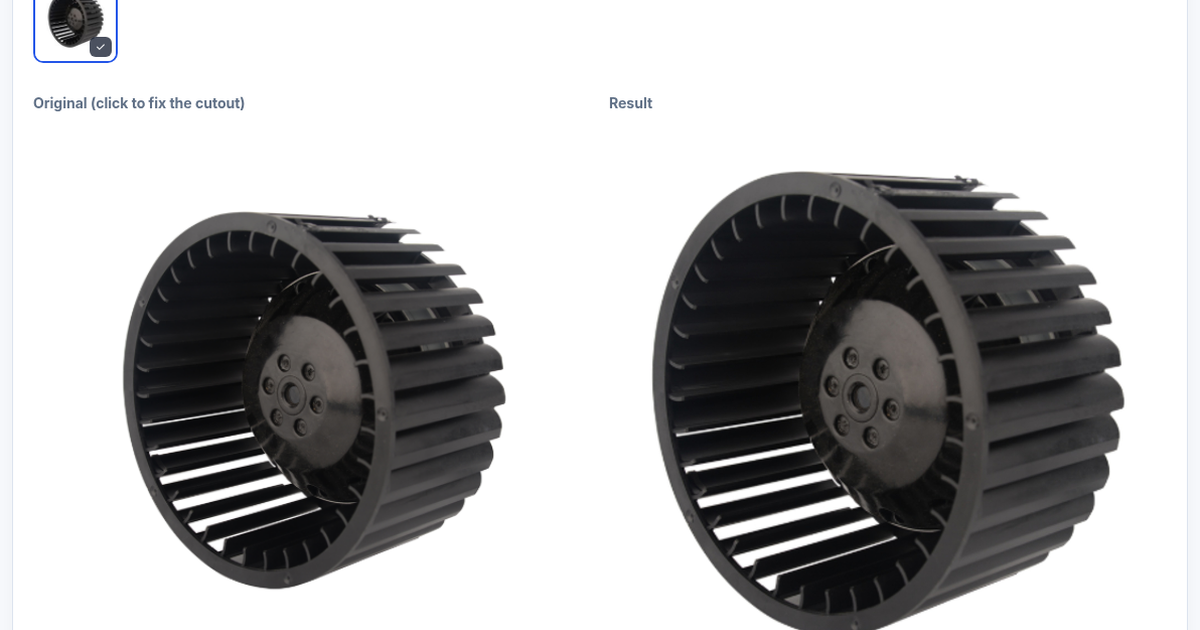
In the product photo studio, choose a marketplace (Amazon main image 2000×2000 pure white, Shopify, eBay, Etsy, Walmart, Tmall/Taobao and more) and drop in a product photo. Local AI removes the background, centres and scales the product, then checks the marketplace rules.
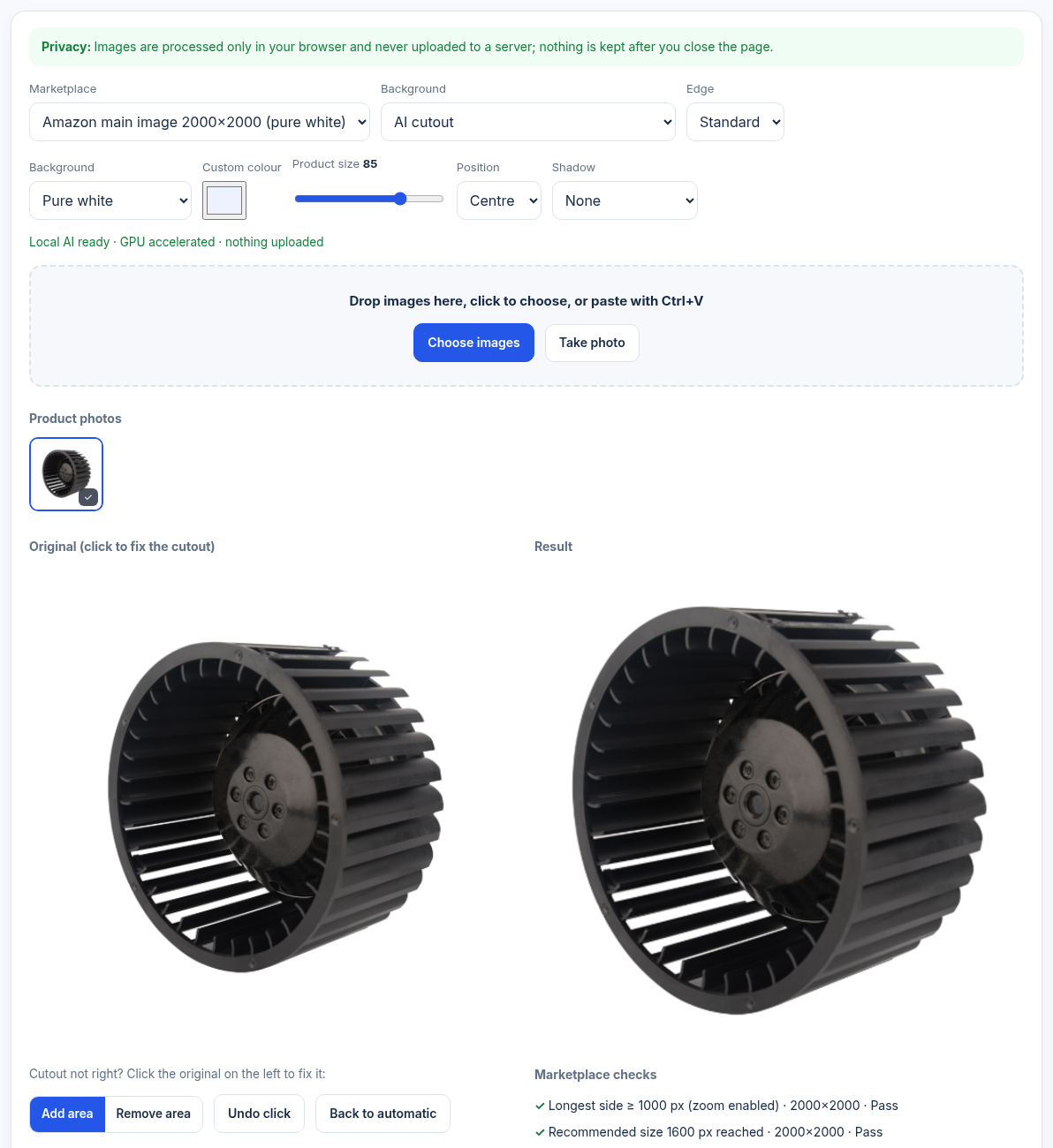
All five checks passed for this blower wheel: longest side, recommended size, 85% product fill, pure-white background and format. The tool also warned that the source had few pixels and was enlarged about 4.7×, so it may look soft, and suggested running the original through the AI image upscaler first. Text, logos and watermarks are still yours to check. See Amazon's product image requirements.
Image to text (OCR): numbers are reliable, terms need a check
Image to text reads English, Simplified Chinese, or both. We tested a fictional hydraulic-hose spec sheet:
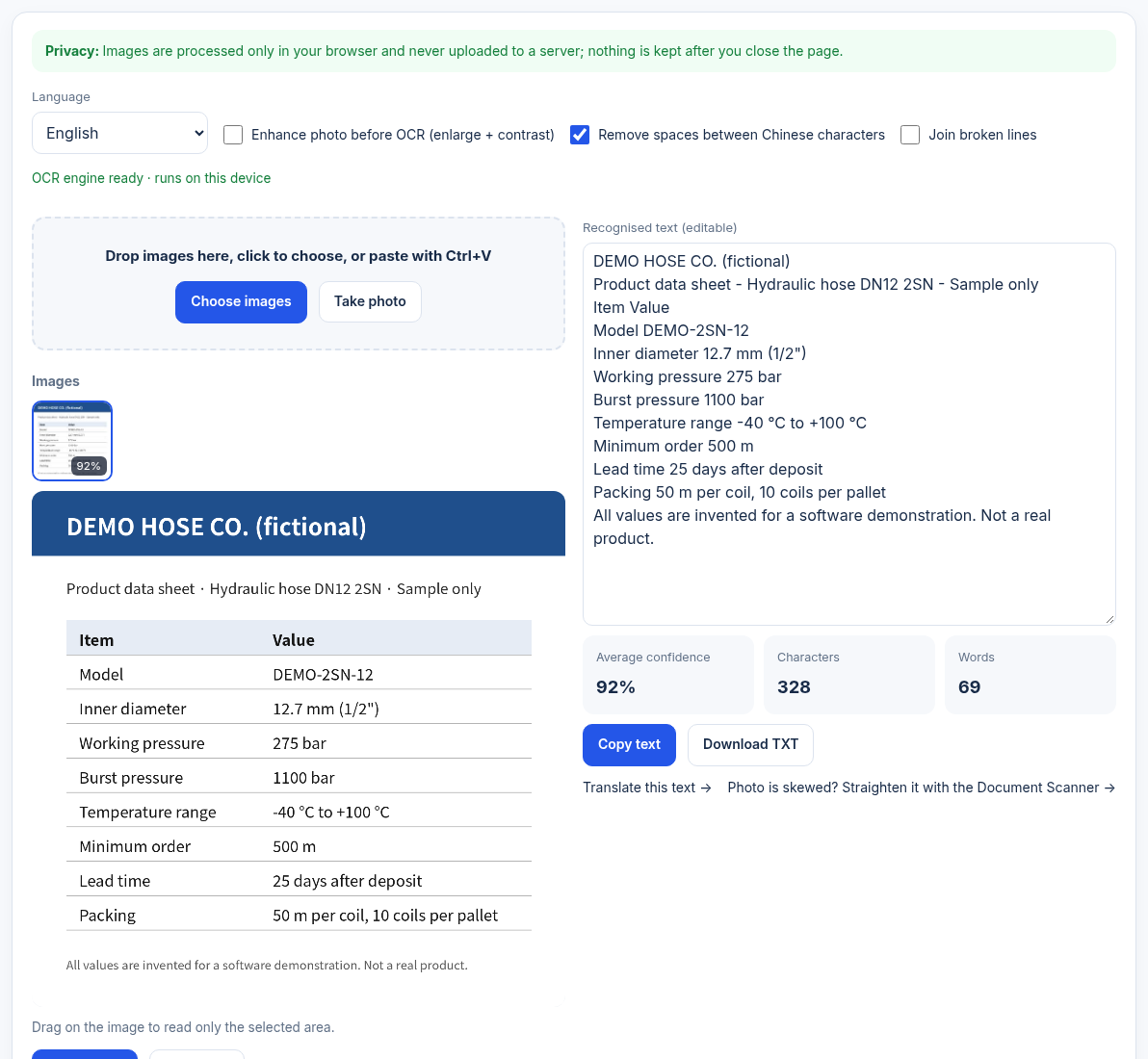
The English sheet scored 92% average confidence, and every model number, pressure, temperature, order quantity and lead time was correct; only the "·" separator came out as "-". The Chinese version of the same sheet scored 86%: all numbers were right, but several Chinese words, including "hydraulic hose", were misread. Trust the numbers, proofread the terms, especially in Chinese. The text can go straight to the text translator.
Document scanner: automatic edges, but check the corners
The document scanner straightens phone photos of paper, removes shadows and combines pages into one PDF. We photographed the spec sheet lying at an angle on a dark desk:
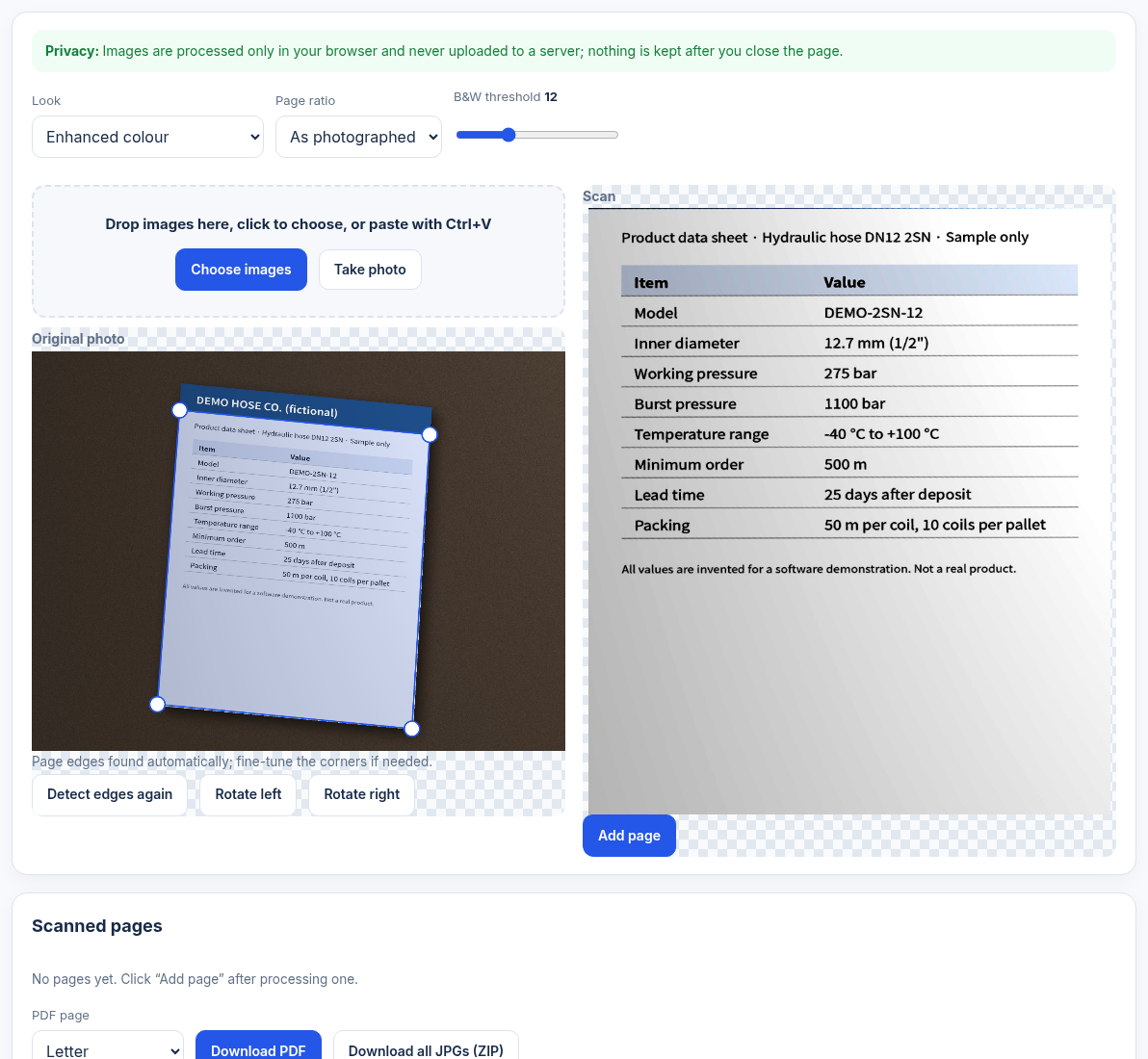
Straightening and enhancement worked well, but edge detection treated the dark-blue header band as background: the two top corners landed below it and the company name was cropped. Drag those two handles to the real paper corners before "Add page". A dark header on a dark desk invites this; shoot with clear contrast between paper and background.
Image alt text generator: always review
The image alt text generator drafts alt text, titles, SEO file names and keywords in bulk. We entered the keyword "centrifugal blower wheel" and uploaded the same photo:
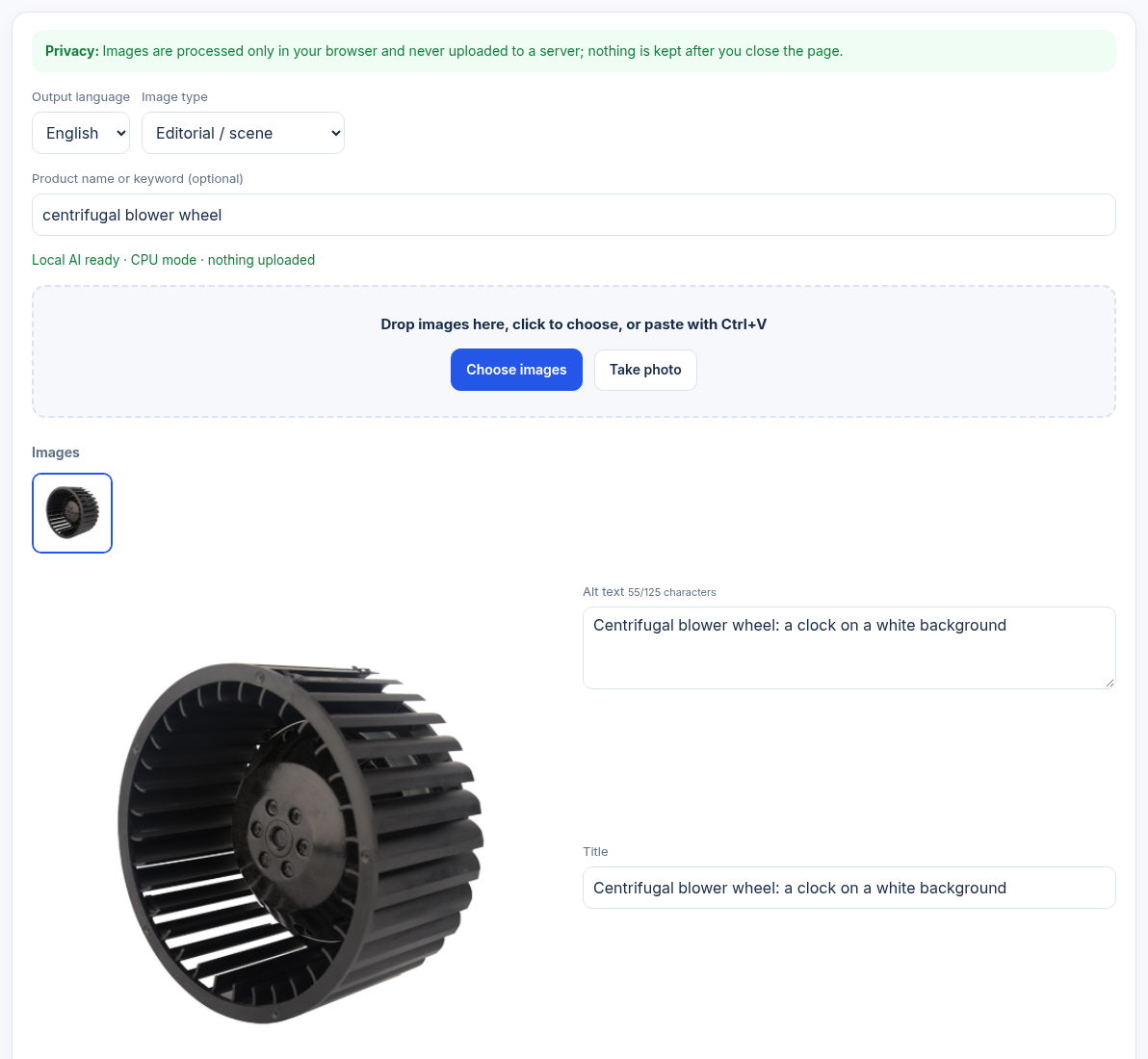
The on-device model saw "a clock", producing "Centrifugal blower wheel: a clock on a white background". The keyword was placed correctly, but the description was wrong. Industrial parts outside common object classes are often misread, so treat the output as a draft and correct each description before copying the HTML or exporting CSV. The W3C alt decision tree is a good guide to writing it.
Two more tools worth knowing
- Face blur: before sharing trade-show or factory photos, detect faces and cover them with mosaic, blur or a solid block; exports strip GPS and other EXIF data. For minors or other sensitive cases, use the solid block, which keeps no original pixels.
- Object counter: counts people, vehicles, bottles and 80 common object classes, with manual marks and CSV export. Screws, fittings and other items outside the list need manual counting.
We did not run screenshot tests of these two; the tool pages describe their current behaviour.
Common questions
Are my images uploaded?
No. The models download into your browser and run there; images are processed on your device and nothing is kept after you close the page.
Can I use OCR output as is?
Numbers and model codes are usually reliable, but technical terms, especially in Chinese, are often misread. In our test "hydraulic hose" in Chinese came out wrong, so proofread before use.
If the product photo studio checks pass, is the image Amazon-compliant?
The tool checks size, fill, pure-white background and format. Text, logos, watermarks and extra items are yours to check, and a very small source should be upscaled first.
Can alt text be fully automatic?
We don't recommend it. The on-device model misreads industrial products; in our test it called a blower wheel a clock. Review every draft.
This guide was prepared with AI assistance; screenshots show live results from November 10, 2026. The spec sheet is fictional; results vary by image and features are shown on the tool pages.
Tools for your next step
Put this guide to work for your business
Create a company account to try website monitoring and the inquiry workbench. Compare Pro plans for your team’s ongoing needs.
No card required. The trial returns to Free when it ends. Paid monthly credits are not included in the trial.