If you sell hydraulic fittings, industrial sensors or specialty tapes, many overseas importers and distributors have no storefront on Google Maps. They are an office and a warehouse with a company website. Searching Maps city by city has limited value; searching Google for company websites works better.
The XunL B2B site miner does exactly that. Choose a country and enter product words; it builds local-language "importer / distributor / wholesaler" queries, runs them through Google Search and curates the results into a list of candidate company websites, de-duplicated by domain, with name, role, country and evidence.
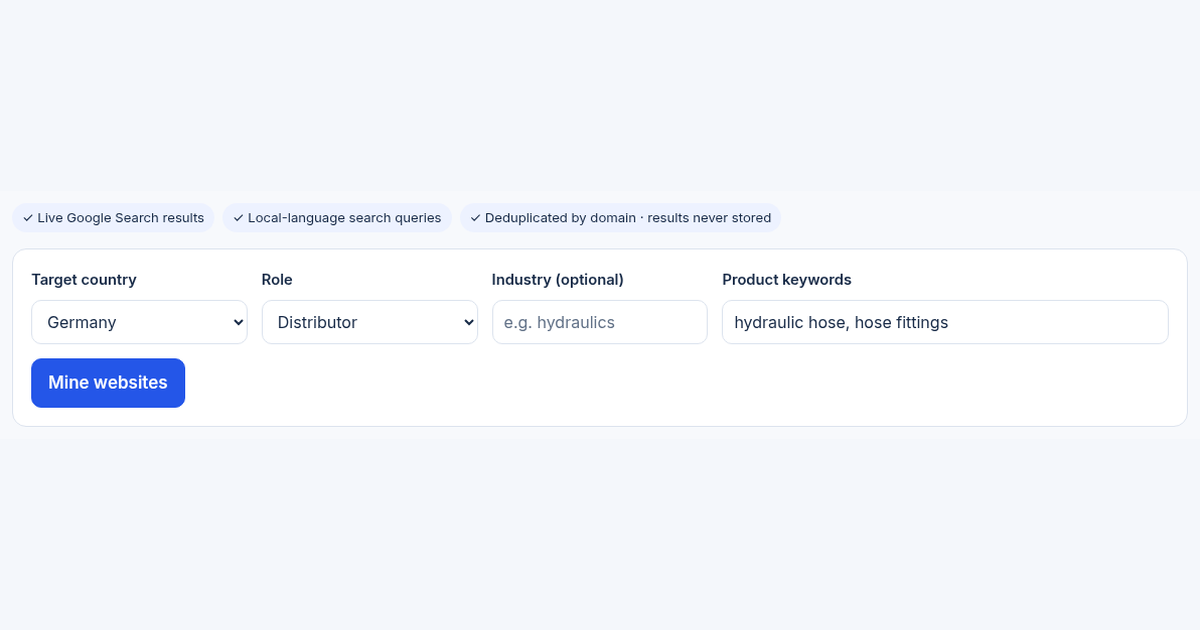
Step 1: choose a country, a role and 1–3 product words
Use the terms your industry actually uses, such as hydraulic hose, hose fittings, rather than a broad word like "hose". The role can be "Any", or importer, distributor, wholesaler or agent. Industry is optional context.
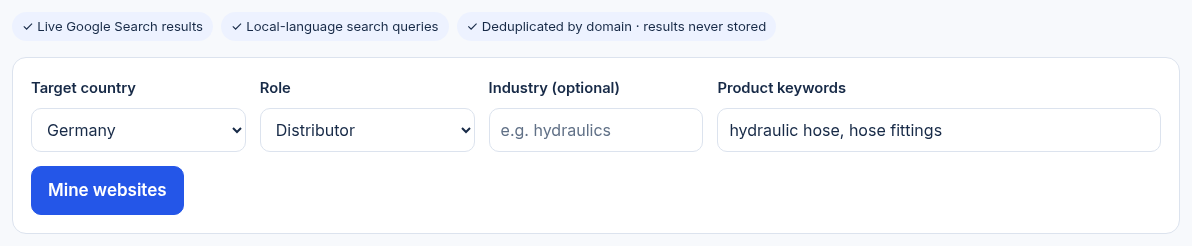
The live tool before submitting. The product words are a demonstration.
Step 2: read the generated search queries first
After submitting, the page first lists the queries it generated. Each combines the country domain (for example site:.de), the role word in the local language (German Großhändler or Importeur, Spanish distribuidor or importador) and your product words, excluding marketplaces such as Alibaba, Amazon and eBay. Every query can be opened in Google so you can check it yourself. See Google Search Central on the site: operator.
This step is useful on its own: it shows how to phrase sharper local-language searches even without the tool.
Step 3: judge each candidate
Results come from Google's Gemini with Grounding with Google Search, and the page shows Google's Search Suggestions and source links as Google requires. The "Candidate websites curated by XunL" table de-duplicates them by domain and removes marketplaces, directories and social sites.
Roles such as importer or distributor are inferred from the search results and can be wrong. Before adopting a company, open its website and check:
- whether its main products relate to yours;
- whether it really imports, distributes or wholesales, rather than manufacturing for itself or retailing;
- whether the site shows company details, an imprint or contact page and a real address.
Step 4: adopt, then read public contacts
Adopt the companies that fit. Only then does the tool read that website's public home, contact and imprint pages for e-mail addresses and contact forms. It checks robots.txt first, skips disallowed pages and gives each page a 5-second timeout.
Then send candidates to the buyer verifier to check address, domain and Maps data, or use "Find similar companies on Google Maps" to open the B2B lead finder. The full flow is in find → mine → verify.
Data and allowances
The country, industry and product words you enter are sent to XunL, which asks Google's Gemini model on Google Cloud Vertex AI to search with Grounding with Google Search. Results, Search Suggestions and source links are shown only to you and never stored or cached; XunL keeps usage counters, your search conditions and the domains you adopt. Guests can try it daily and accounts get more searches and adoptions; see the tool page for current allowances.
Common questions
How is this different from the B2B lead finder?
The lead finder searches Google Maps for businesses with a listed location. The site miner searches Google for company websites, which suits niche industrial products and importers or distributors without a Maps listing. Each tool links to the other.
How are the search queries built?
From the country domain (such as site:.de), the role word in the local language and your product words, excluding marketplaces such as Alibaba, Amazon and eBay. You can open every query in Google yourself.
How accurate are the results?
Roles are inferred from search results and can be wrong. Open the website before adopting a company, then check its address and domain with the buyer verifier.
Where do the contacts come from?
Only after you adopt a domain, from that website's public home, contact and imprint pages. robots.txt is checked first and disallowed pages are skipped.
This guide was prepared with AI assistance and checked against the live tool page on November 10, 2026. The product words are examples, not customer results; allowances and features are shown on the tool page.
Tools for your next step
Put this guide to work for your business
Create a company account to try website monitoring and the inquiry workbench. Compare Pro plans for your team’s ongoing needs.
No card required. The trial returns to Free when it ends. Paid monthly credits are not included in the trial.