After a WordPress redesign, a list of 404 URLs is useful only if someone can find and fix the links pointing to them. A practical repair list needs the destination URL, its response, the referring page and the anchor text.
For an occasional check of public pages, the XunL broken link checker provides a browser interface for a server-side crawl and downloadable results. This guide shows how to turn those results into a WordPress repair workflow, using a real, deliberately limited crawl.
Start with a small crawl you can interpret
Choose a homepage, blog index or section affected by the redesign. For a first pass, use a limit of 100 URLs and a depth of 2. Leave external links, resources and sitemap discovery off until you have confirmed that the starting pages can be read.
The start URL is an entry point, not a directory restriction. Navigation links can take the crawler to other parts of the same site. A crawl stopped by its URL limit is a sample of what it found, not a site-wide clean bill of health.
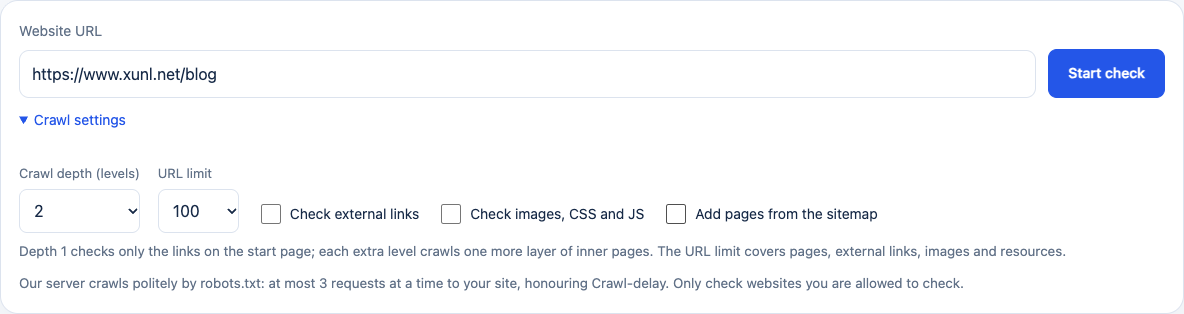
XunL respects robots.txt restrictions and Crawl-delay. Its default same-site concurrency is at most three requests; Crawl-delay switches it to spaced, sequential requests. It reads the HTML returned by the server without executing JavaScript. Links created only after scripts run need a rendering-capable crawler or another check.
What our real crawl found
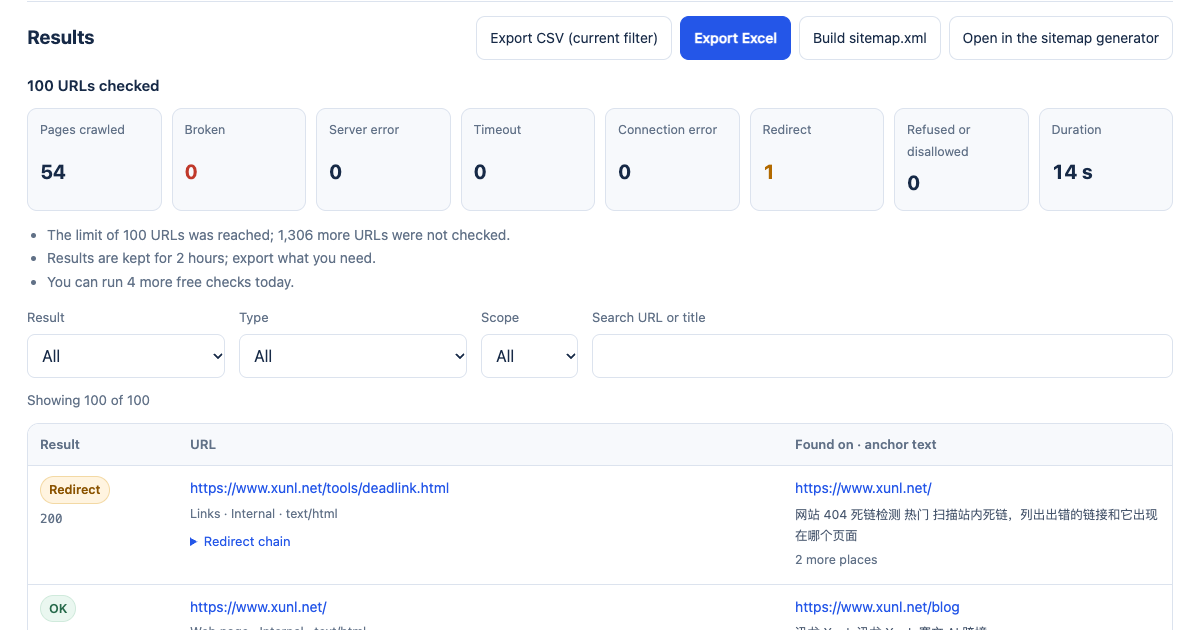
On October 24, 2026, we started at https://www.xunl.net/blog with those settings. The report contained 100 URL records: 67 OK, one redirect and 32 skipped according to the settings. It crawled 54 HTML pages and took 13.5 seconds, shown as 14 seconds in the interface.
There were no 404s, server errors or timeouts in the portion checked. The report also warned that the 100-URL limit had been reached and another 1,306 discovered URLs had not been checked. That warning is part of the result and must stay with any exported conclusion.
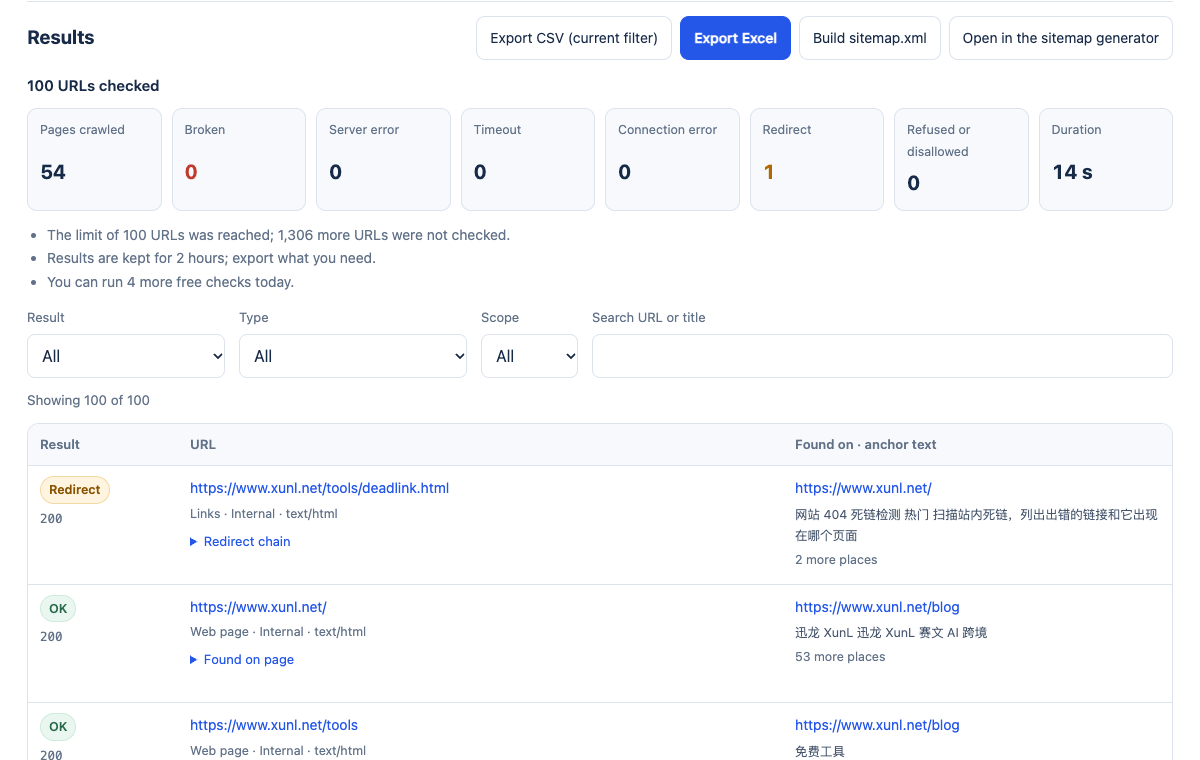
The useful record was an old tool URL, /tools/deadlink.html. It returned 301, leading to /tools/broken-link-checker/, which returned 200. The report recorded three places linking to the old address: the homepage, a keyword planner page and a Baidu submission tool page. It included the Chinese anchor text used at each location.
This was a working compatibility redirect, not a broken page. It identified internal links that could be updated to point directly to the current URL. We did not insert a broken link to create a demonstration, and did not edit those production links during this test.
Export the information a WordPress editor needs
Filter for broken links, then review the internal results first. For each item, preserve the destination, response, referring page and anchor text or image alt text. Expand the source details when a URL appears in more than one place.
CSV follows the current filter and has one row per URL, including its first recorded source. For errors with several referring pages, the Excel workbook's Where problems appear sheet provides separate saved source records. That sheet covers broken links, server errors, timeouts and connection errors. Review redirects through their own filter and expanded source details; an empty problem sheet does not mean there are no redirects. The problem sheets in our exported workbook were empty, consistent with this crawl finding none of those errors.
Add an action column and a retest column before assigning repairs. One old address can appear in a post, a menu and a footer; tracking the referring locations prevents a partial fix from being mistaken for completion.
Fix the cause in WordPress
For an illustrative example—not a finding from this test—suppose a product page's “Download catalogue” button points to /downloads/catalogue-old.pdf and returns 404. Open the referring product page, locate that button, and verify the intended file in the media library before changing the link.
| Cause | Repair | What to verify afterwards |
|---|---|---|
| Typo, old filename or incorrect path | Update the link in the referring post, page or button | The saved page points to the intended content |
| A menu, footer or shared block repeats an old URL | Update the relevant navigation, template or page-builder component | Every recorded referring location is corrected |
| Content permanently moved to an equivalent new page | Update internal references and redirect the old URL to the relevant replacement | The old address reaches the replacement; internal links can go directly to its 200 URL |
| Content was removed without a suitable replacement | Remove or rewrite the referring link; return an appropriate 404/410 for the removed content | Visitors are no longer sent to a missing resource |
| Many existing posts become 404 after a redesign | Check permalink settings and server rewrite rules before bulk changes | Existing content works again without unrelated redirects masking the fault |
WordPress permalink settings affect post and archive URLs; the official permalink settings documentation is a useful starting point. Have the site maintainer check whether the server uses Apache or Nginx before changing rewrite configuration. For permanently moved content, Google's redirect guidance explains server-side 301 and 308 responses.
Keep blocked requests separate from missing pages
A 404 or 410 calls for checking whether the link is wrong, the content moved or the resource was removed. A missing image needs the same source-page investigation as a missing document.
A 401 or 403 may reflect authentication or an access rule. A 429 may be rate limiting. Open the page manually and investigate the response before deciding that its content is gone. Keep 5xx errors, timeouts and connection failures in a separate retry list with the original check time.
Redirects also deserve their own review. Follow the chain to its final response. A redirect that ends at the intended 200 page is reachable, while a chain ending at 404 still needs attention. After a permanent move, updating internal links to the final URL removes the unnecessary hop.
When is XunL a suitable Screaming Frog alternative?
XunL fits the specific job of checking public links, locating references and exporting a repair list. Current limits are 5,000 URLs per crawl, depth 1–10 and 20 minutes. The URL budget includes resources and external links, not just HTML pages. Anonymous visitors get five crawls per network per day; signed-in users get 15, with one active job at a time. Results remain available for two hours, so export promptly. Current XunL limits
Screaming Frog SEO Spider also has a free 500-URL edition, including broken-link checks and source exports. Export is not universally a paid-only feature. Its paid capabilities include JavaScript rendering, saving and reopening crawls, crawl comparison, custom extraction and GA/GSC integrations. Check the official feature comparison and broken-link tutorial when those needs matter.
This is a comparison of a link-checking task, not a benchmark of complete technical SEO audit suites.
Retest the same references
After saving the repairs and allowing relevant caches to update, open the changed source and destination pages manually. Repeat the crawl with the same entry point, depth and options, then compare it with the original list. Confirm that missing targets are fixed, images load, and redirects lead to relevant content.
If the first run hit a limit, plan further checks from other entry points or with a larger budget, keeping each run's coverage note. For broader checks, continue with the website diagnostics workflow. To begin, open the broken link checker and export a small repair list for the section you have just changed.
Put this guide to work for your business
Create a company account to try website monitoring and the inquiry workbench. Compare Pro plans for your team’s ongoing needs.
No card required. The trial returns to Free when it ends. Paid monthly credits are not included in the trial.