A steel-tube cut list needs more than a sum of finished lengths divided by the length of a new bar. Blade width, trimmed ends and usable offcuts can change what you need to buy. A useful plan also lets you reconcile every millimetre of an individual bar.
Open the XunL linear cut list optimizer to paste a list, account for those allowances and export a cutting plan. This worked example uses twelve straight-cut parts, 6,000mm new stock and one existing 2,400mm offcut. Names, prices and cutting settings are fictional demonstration inputs, not a standard process for a particular tube.
Use 1D cutting for lengths from the same material
Linear cutting fits tube, extrusion, timber and other stock arranged along one dimension. Different cross-sections, wall thicknesses, grades or finishes belong in separate jobs unless the stock is actually interchangeable.
For rectangular pieces with both length and width, use the sheet nesting optimizer. Its grain and edge-banding workflow is covered in the plywood cut-list guide.
Our tube example assumes one material specification and straight cuts. Mitre geometry, welding allowances and machine constraints need their own process review.
Enter the stock and twelve required parts
Select mm before entering these stock rows. The English interface initially uses inches; simply typing 6000 into an inch field would describe a different job.
| Stock | Length | Available quantity | Example price | Offcut setting |
|---|---|---|---|---|
| New stock | 6,000mm | Blank: unlimited | CNY120 per bar | Unchecked |
| Existing offcut | 2,400mm | 1 | 0 | Checked: use first |
The zero price for the existing offcut makes this an incremental purchasing comparison. It does not mean the material has no value. Use your own costing basis when you need full material cost; the displayed amount is not profit.
Expand “Paste from a spreadsheet,” paste these three columns and choose “Replace list”:
Upright    1450    4
Rail       1200    4
Brace      850     2
Connector  450     2
There are four distinct sizes and twelve physical pieces, totaling 13,200mm of finished parts. Set kerf to 3mm, end trim to 10mm at each end, and the minimum offcut to keep to 500mm. The trim setting removes 20mm per bar, including the existing offcut in this example.
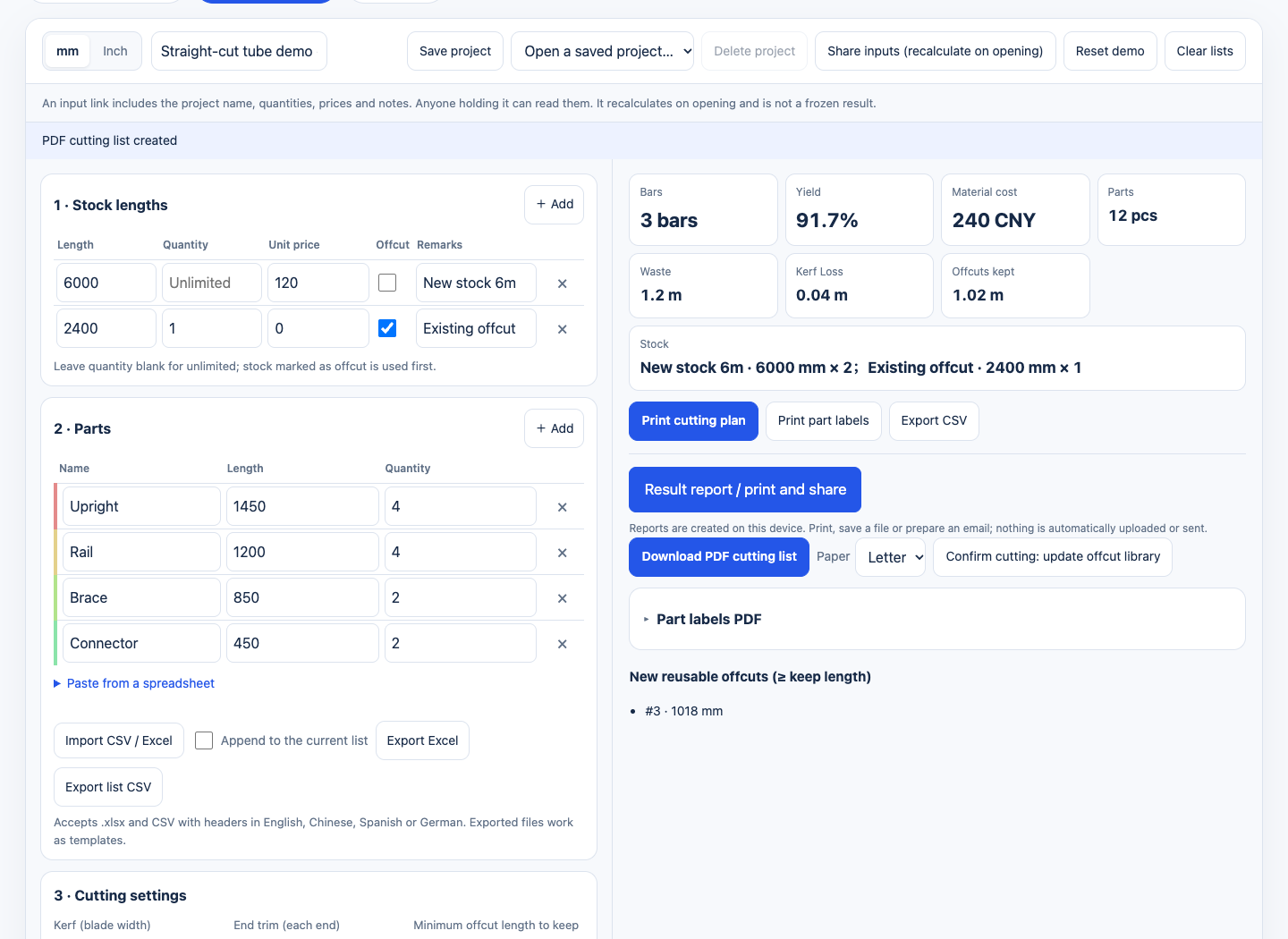
The example uses millimetres and CNY in the English interface. Summary totals for waste and offcuts are displayed in metres.
Read three bars used as two new bars plus an offcut
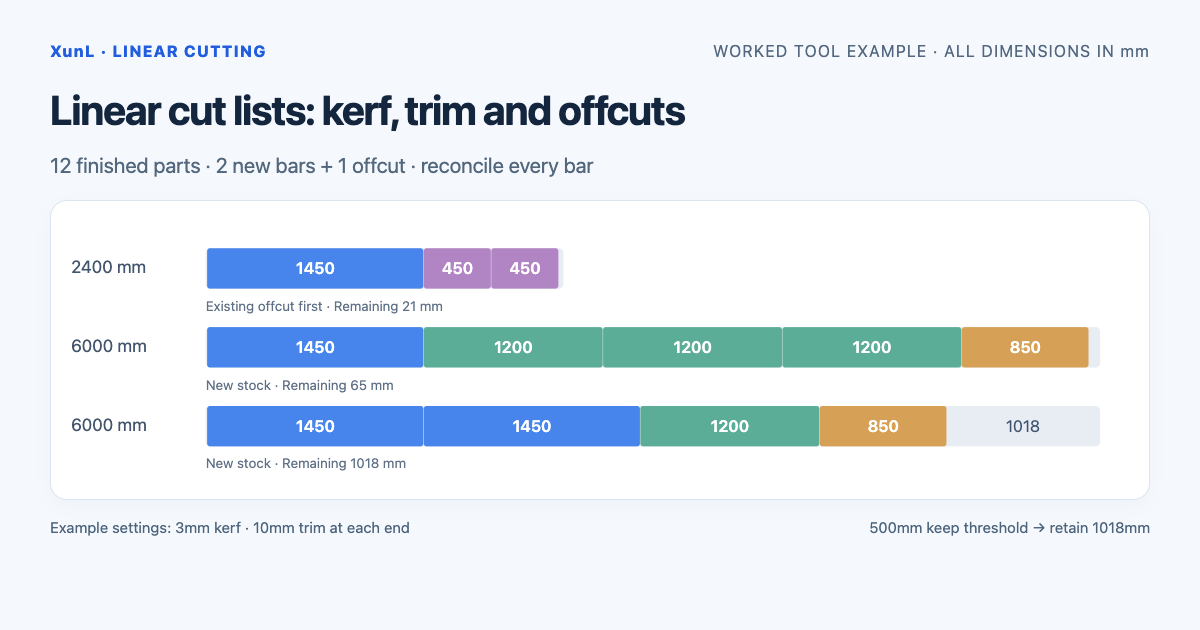
The live run used two 6,000mm new bars and the existing 2,400mm offcut. It placed all twelve parts, showed a 91.7% finished-length yield and a CNY240 input material cost.
| Source | Finished pieces, mm | Finished length | Kerf | Both end trims | Remaining offcut |
|---|---|---|---|---|---|
| Bar 1: existing 2,400mm | 1450 + 450 + 450 | 2,350 | 9 | 20 | 21 |
| Bar 2: new 6,000mm | 1450 + 1200 + 1200 + 1200 + 850 | 5,900 | 15 | 20 | 65 |
| Bar 3: new 6,000mm | 1450 + 1450 + 1200 + 850 | 4,950 | 12 | 20 | 1,018 |
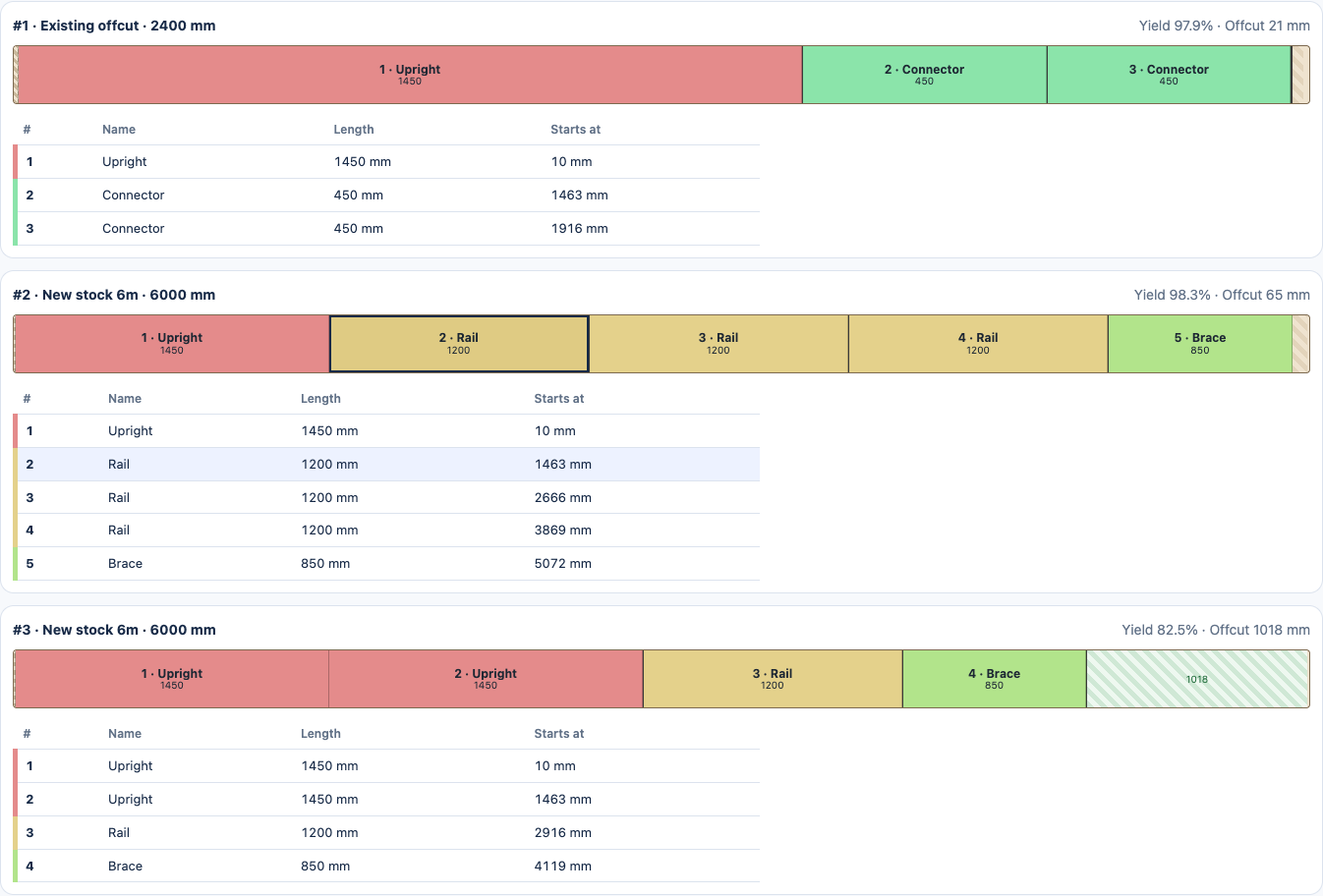
Use the tables below each pattern for names, lengths and start positions, especially where a narrow segment cannot hold a full label.
Reconcile the second bar before accepting the whole plan:
5,900 finished + 15 kerf + 20 trim + 65 remaining = 6,000mm
Across all three bars, 13,200mm of parts + 36mm of kerf + 60mm of trim + 1,104mm remaining = 14,400mm of input stock. Each bar in this example leaves a remainder, so a final separating cut is included. Do not assume that every pattern always has exactly one fewer cut than parts: the treatment of the final piece and remaining stock matters.
The summary rounds kerf to about 0.04m and kept offcuts to about 1.02m. Use the detailed millimetre values and start positions for review, rather than working backward from rounded summary numbers.
Compare the same job without the old offcut
Temporarily change the existing offcut's quantity to zero and leave everything else unchanged. This run required three new 6,000mm bars and showed CNY360. Restore the existing offcut quantity to one and the new-stock requirement returns to two bars.
That is a purchasing difference for this specific input. It is not a general savings percentage or a comparison against another optimizer. The longer remainder in the new-stock-only run may also have future use; unused length should not automatically be valued as scrap.
With the offcut included, the three remaining lengths are 21mm, 65mm and 1,018mm. Only 1,018mm meets the 500mm keep threshold. Finished-part yield and the value potentially recovered through future offcut use are different measures.
Export a plan before updating the offcut library
Download the PDF cutting list and check names, lengths, quantities and start positions. Export CSV if you want to count every allocated piece: the actual English and Chinese CSV exports for this example each contain twelve part rows. For part labels, choose the intended sheet or roll and check alignment on a physical sample.
“Confirm cutting: update offcut library” stores qualifying remnants in this browser. Use it after the cuts and actual remaining lengths have been confirmed. Committing every trial plan would turn proposed offcuts into misleading stock for the next job.
Saved projects and the offcut library are local browser records. Do not assume they follow you to another browser or device. A shared input link recalculates when opened; retain the PDF or CSV when you need a record of the particular plan you reviewed.
Where this can replace an optiCutter or CutLogic 1D task
For a straight-length job requiring stock rows, kerf, trim, offcut priority and an exported cutting list, this browser workflow provides a practical starting point.
optiCutter offers a free linear calculator alongside paid plans. Its current plan table lists five stock sizes, twenty part sizes and 500 physical parts for Free. This twelve-piece example fits those quantity limits, so payment is not inherently required for this job.
CutLogic 1D also has free and paid editions, with inventory, reporting and integration capabilities described by its vendor. Check the edition comparison when you need workshop databases, shared inventory or production interfaces. A browser-local offcut list is not an equivalent manufacturing system. We did not benchmark competing solvers for speed or yield here.
Check the manufacturing assumptions before cutting
- Enter measured usable stock lengths and the actual kerf. Confirm trimming, gripping and machining allowances for the process instead of copying the example settings. Establish whether the trim allowance already includes its trimming cut, so that loss is neither omitted nor counted twice.
- Reconcile every required quantity, and resolve unplaced pieces or incompatible stock before purchasing.
- Use a suitable process model for mitres, alternating angles, welding allowances and machine-specific constraints; straight-length allocation does not fully model them.
- XunL accepts up to 20,000 physical pieces per run. Use its output for planning and comparison, with no assumption of globally optimal results for every order.
Paste your own single-specification list into the linear stock cutting calculator, check one complete bar's length balance, then review the purchasing and cutting plan.
Put this guide to work for your business
Create a company account to try website monitoring and the inquiry workbench. Compare Pro plans for your team’s ongoing needs.
No card required. The trial returns to Free when it ends. Paid monthly credits are not included in the trial.