XunL can prepare a smaller copy of a product catalogue for email without creating an account or uploading the PDF to a compression server. The useful choice comes first: do you need to keep selectable model numbers and clickable links, or is a readable image of each page enough?
Its two compression paths answer different needs. Structural optimization preserves page content and may save very little space. Catalogue image compression rebuilds pages as pictures, which can reduce an image-heavy document much further while removing text and interactive document features.
Open XunL PDF tools and choose Compress PDF. The current tool is free, has no watermark or usage-count limit, and accepts each PDF up to 40 MB and 60 pages. Those limits still apply when the desired output is much smaller.
Define the attachment requirement before lowering quality
For this example, assume the recipient requires each attachment to be below 2 MB. That is a demonstration target, not a universal email limit. Confirm whether the recipient limits individual files or the whole message, leave some margin, and check the destination system.
Also decide what “usable” means. A buyer may need to copy a part number into an order, search the catalogue or click through to a product page. A PDF that looks fine but has lost those features may fail the task even if its file size passes.
Start with structural optimization for that kind of document. Consider an image-based copy when the recipient only needs to read the pages. Keep forms, accessibility requirements and certificate-signed documents in a workflow that explicitly supports those features.
A four-page test: the smaller result lost text and links
On 24 October 2026, we ran the same self-made fictional catalogue through the normal Chinese and English XunL interfaces and downloaded both compression outputs. The four-page input contained synthetic equipment illustrations, selectable text and one ordinary web link per page. All models, quantities and amounts were test content rather than a real offer.
| Version | Exact file size | Text and ordinary web links |
|---|---|---|
| Original | 3,939,225 bytes | 1,812 extracted characters; 4 links |
| Structural optimization | 3,937,180 bytes | 1,812 characters; 4 links retained |
| Catalogue images: 150 DPI, JPG quality 80% | 799,149 bytes | 0 extracted characters; 0 links |
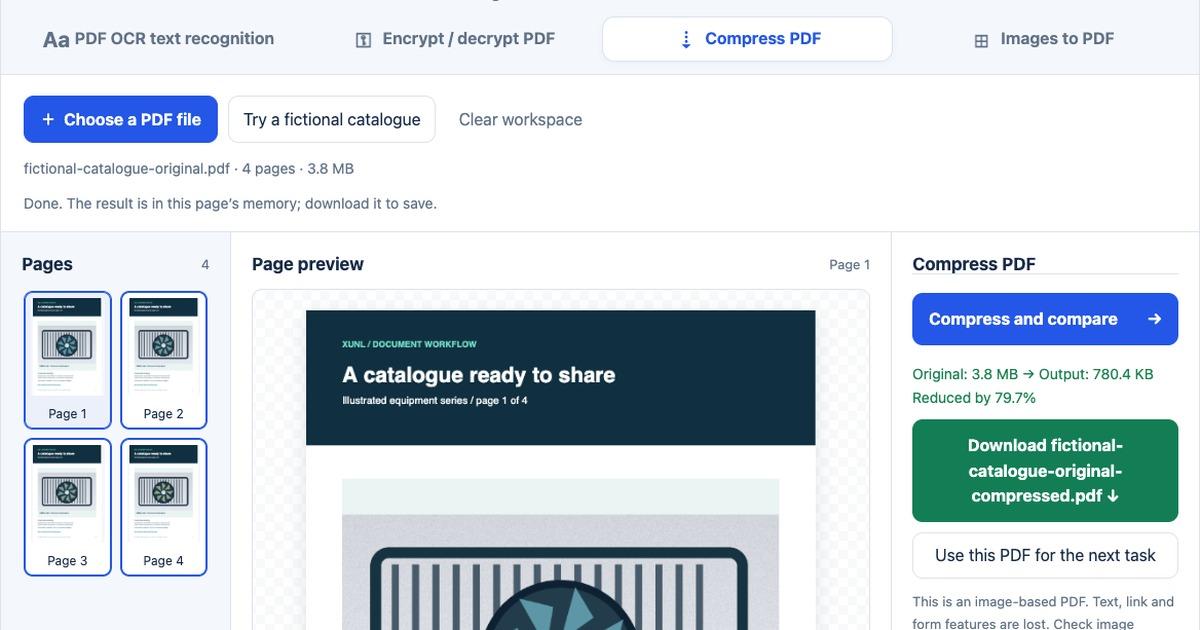
Using decimal units, the input is about 3.94 MB and the image-based result about 0.80 MB. XunL's display uses 1024-based, rounded values and shows “3.8 MB → 780.4 KB.” Use the downloaded file's actual byte count when comparing it with a receiving system's requirement; unit labels and rounding can differ.
Both language interfaces produced the same file sizes. Structural optimization saved just 2,045 bytes. The image version reduced this particular file by about 79.7% and passed our assumed 2 MB target. It also changed selectable model numbers into pixels. Four pages remaining is not proof that all document features survived.
Try structural optimization first
Choose Compress PDF, load the original catalogue and confirm its file name and page count. Select Structural optimization · preserve page content, then choose Compress and compare and download the output.
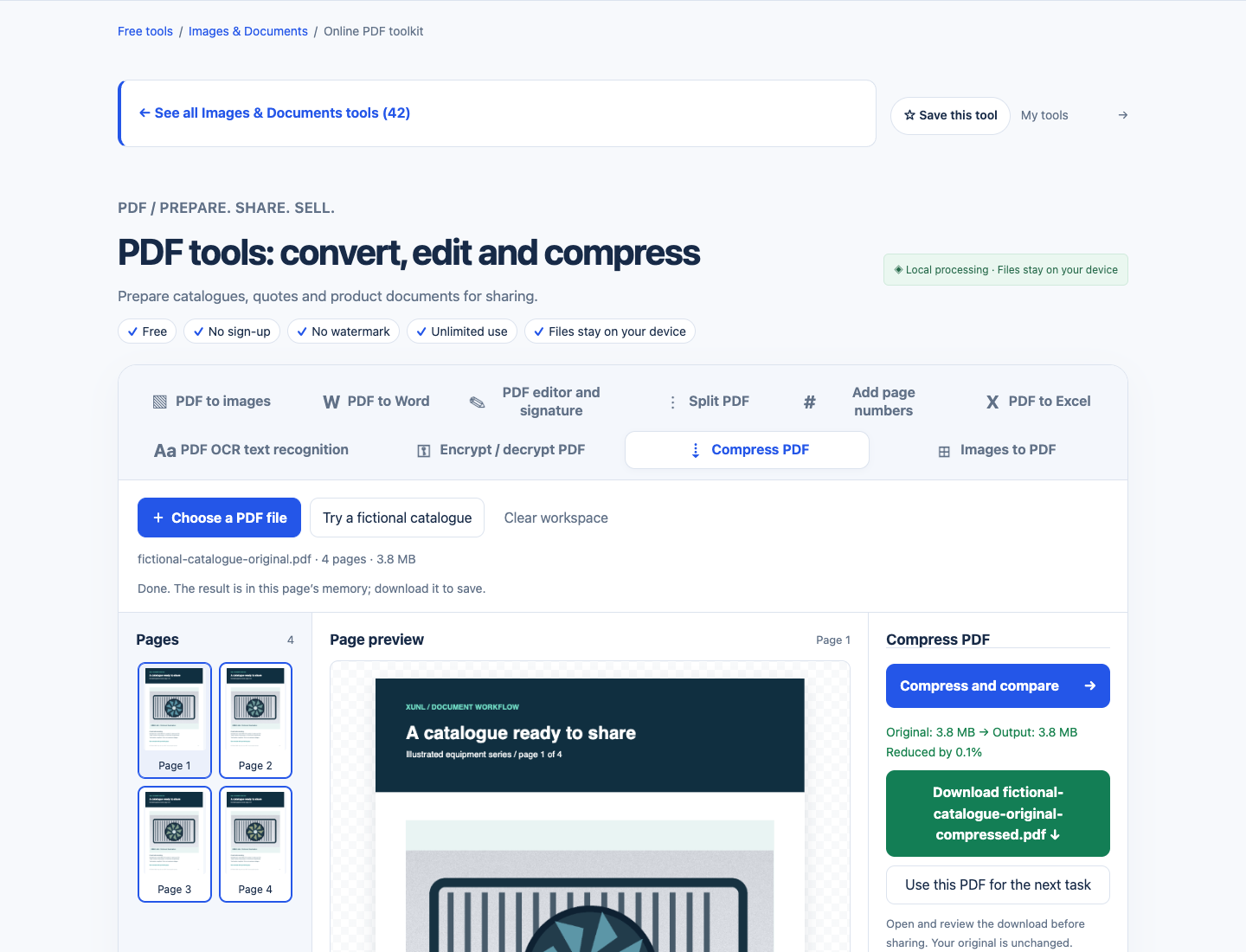
In our downloaded result, all 1,812 extracted characters and four ordinary web links remained. That makes this path worth trying when text matters. It does not promise that a multi-megabyte file will become a few hundred kilobytes.
Saving also removes scripts and unsafe document actions. Treat the result as a processed copy rather than a byte-identical archive. For valid certificate signatures or specialist interactive features, keep the original and use the appropriate document workflow.
If it is still too large, decide whether page images are acceptable
For a reading-only copy, select Catalogue image compression · loses document features. Our test used 150 DPI and 80% JPG quality. Read and tick the loss acknowledgement before running the task.
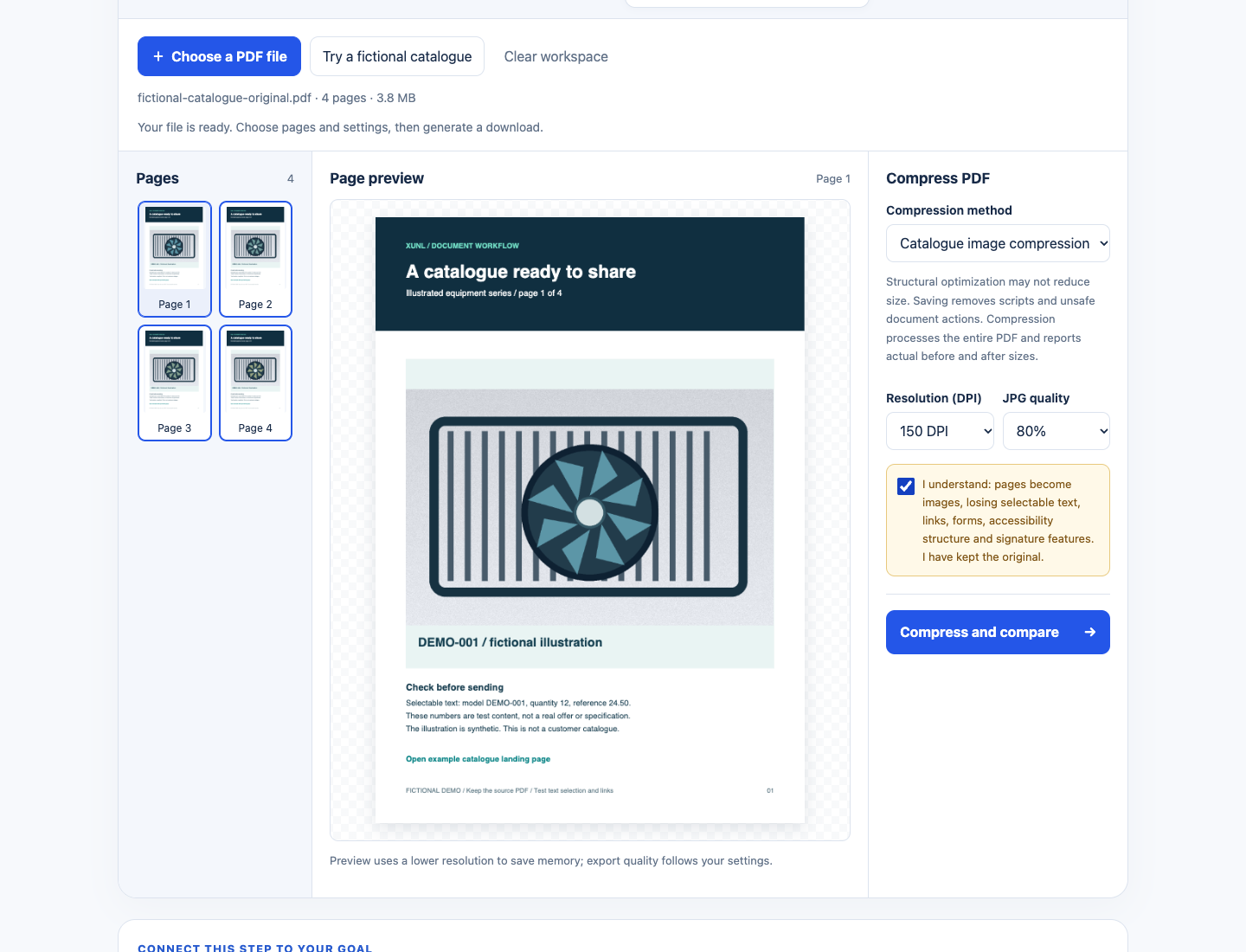
The acknowledgement matters: pages become images, losing selectable text, links, forms, accessibility structure and signature features. This is a different kind of PDF, not a lossless way of shrinking the same document.
Our download was 799,149 bytes and still contained four pages. Independent text extraction found no text; annotation inspection found no ordinary web links.
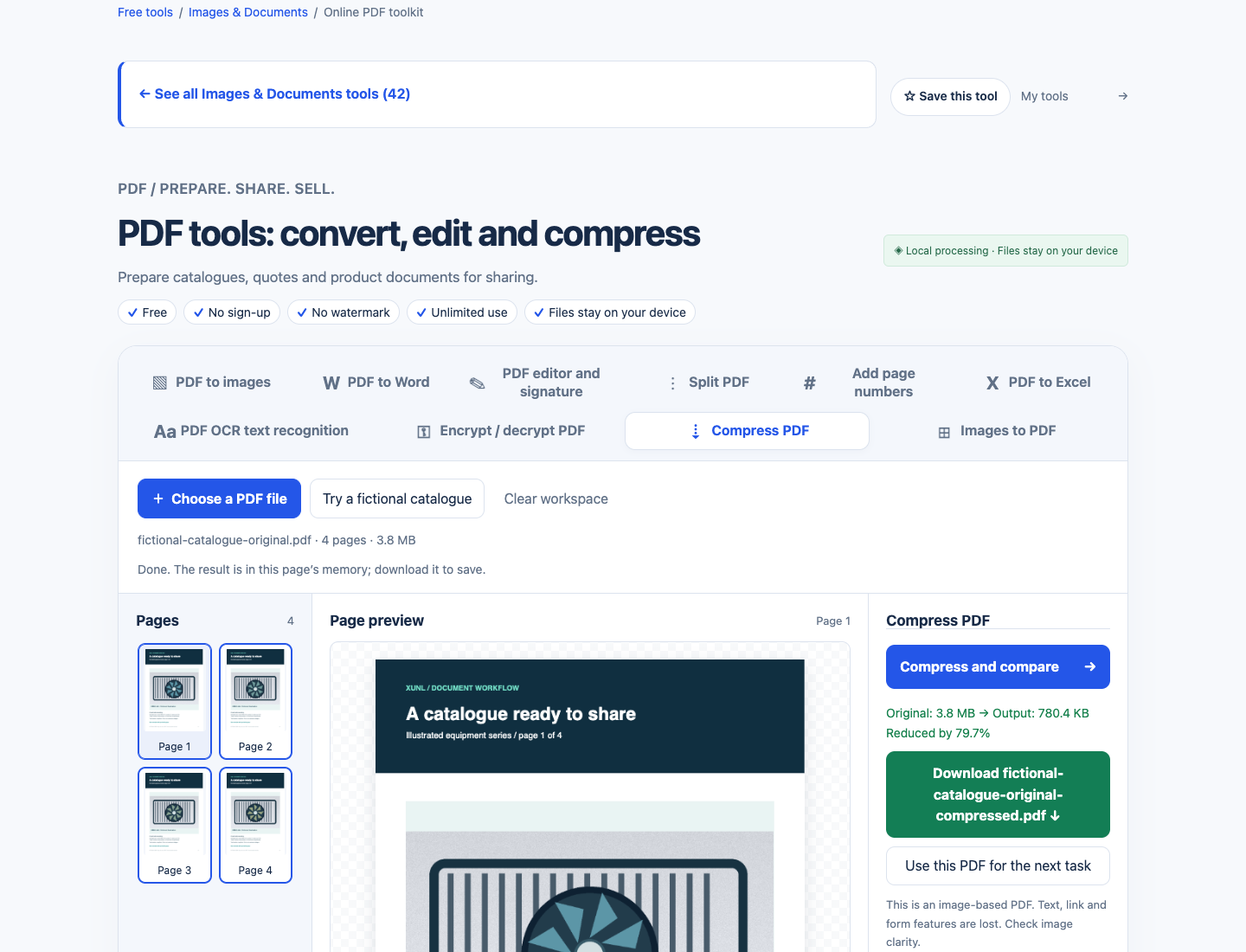
Open the downloaded PDF, not just the browser thumbnail, to judge readability. Check the smallest model number, decimal point, unit label and fine line. A clear cover image does not prove that a specification table is legible. The tool's on-page preview uses a lower resolution to save memory.
For another trial, work from the original again. Changing tasks directly uses the currently loaded input; Use this PDF for the next task deliberately promotes an output to the next input. Avoid accidentally treating an already rasterized, lower-quality copy as your master.
A Smallpdf, iLovePDF or Acrobat alternative for this one task
Yes. XunL offers a local browser workflow for compressing an ordinary catalogue within its 40 MB and 60-page limits. It can cover the immediate task of making a sendable copy, with the two approaches and tradeoffs demonstrated above.
Choose between products by the features you need to retain, processing location and surrounding workflow. Current official compression pages show:
| Tool | Compression options or conditions | When to consider it |
|---|---|---|
| XunL | Structural optimization or catalogue image compression; both tested here | A no-account local workflow, with manual checks of size and document features |
| Adobe Acrobat | Online High, Medium and Low compression; its page says files are handled on Adobe servers | An existing Acrobat workflow, while distinguishing the online service from desktop processing |
| Smallpdf | Basic compression is free; Moderate and Strong are marked Pro, and free use may have limits | Its compression tiers or subsequent cloud document workflow fit your needs |
| iLovePDF | Extreme, Recommended and Less compression; free and paid account types | You want its quality presets and have checked the current account limits |
These are official feature checks as of 24 October 2026. We did not upload this test file to those competitors or measure their output quality, compression ratio or speed. Each also has a free entry point, so “paid-software alternative” should not be read as “the other tools always require payment.”
Sources: Adobe's online compression guide, Smallpdf compression and plans, iLovePDF compression levels and account types.
For original-text editing, secure redaction, certificate-based digital signatures or a broader document management workflow, compare those capabilities separately. The comparison here concerns catalogue compression, rather than replacing an entire PDF software suite.
What if the PDF will not get below 2 MB?
Little or no structural reduction can be a valid result. A source PDF may already be efficiently encoded, or its size may be dominated by existing images. Repeatedly processing it need not create further savings.
Try a lower DPI or JPG quality from the original, then inspect the downloaded result again. XunL does not guarantee an arbitrary target size such as 2 MB, 1 MB or 500 KB. If small text becomes unclear before the target is reached, stop lowering quality.
Reduce the source document's weight. Re-export appropriately sized images from the design file, omit pages the buyer does not need, or agree on an approved download link instead of an attachment. Preserve a high-quality master.
Keep the original if the image version grows. Rasterizing a compact text or vector document can make it larger. Compare actual bytes rather than assuming that running a “compress” command must help.
If selectable text is mandatory, the image result is unsuitable. OCR afterward does not reconstruct the original links, forms or accessibility structure. Our image output passed the size target but failed that text requirement, so a different source export or document workflow would be necessary.
What local processing means
The current XunL PDF compressor reads and processes the PDF in the browser rather than sending the PDF content to a compression server. The page still loads code, fonts and other network resources. Local file processing is not a claim that the entire website is offline or makes no network requests. Follow your organization's document handling rules and download the result before closing the page.
Before sending, check actual size, complete page count, readable small text, and any text or links the recipient needs. A successful download is only the start of that review.
Compress a catalogue copy with XunL PDF tools, starting with structural optimization and using image compression only when its tradeoffs fit the recipient's needs.
Put this guide to work for your business
Create a company account to try website monitoring and the inquiry workbench. Compare Pro plans for your team’s ongoing needs.
No card required. The trial returns to Free when it ends. Paid monthly credits are not included in the trial.